
Karaoke Word Highlight — Timed Lyrics That Fill As Sung
Karaoke Word Highlight · Text Animation · Plain HTML, CSS & JS · Live preview
Copy & paste
Source Code
<main class="stage">
  <div class="player">
    <p class="track">Now playing · Ship It Twice</p>
    <div class="lyrics" id="lyrics" aria-live="off"></div>
    <div class="bar" id="bar" role="progressbar" aria-label="Song progress" aria-valuemin="0" aria-valuemax="100" aria-valuenow="0"><span id="fill"></span></div>
    <div class="row">
      <button type="button" id="play" class="play">Play</button>
      <button type="button" id="restart" class="ghost">Restart</button>
      <span class="time" id="time">0:00</span>
    </div>
  </div>
</main>*{box-sizing:border-box;margin:0;padding:0}
body{min-height:100vh;display:grid;place-items:center;background:linear-gradient(160deg,#1e1038,#0c0716);font-family:system-ui,sans-serif;color:#fff}
.stage{width:100%;padding:22px 16px;display:grid;place-items:center}
.player{width:min(620px,100%);padding:26px 26px 22px;border-radius:22px;background:rgba(255,255,255,.05);border:1px solid rgba(255,255,255,.1)}
.track{font-size:12px;letter-spacing:.24em;text-transform:uppercase;color:#c4a8f5;margin-bottom:18px}
.lyrics{display:grid;gap:10px;min-height:190px;align-content:center}
.line{font-size:clamp(22px,4.6vw,34px);font-weight:800;line-height:1.25;opacity:.35;transform:scale(.97);transform-origin:left;transition:opacity .35s,transform .35s}
.line.now{opacity:1;transform:none}
.word{display:inline-block;margin-right:.28em;color:transparent;
background:linear-gradient(90deg,#f0abfc 50%,#6b5b8f 50%) 100% 0 / 200% 100%;
-webkit-background-clip:text;background-clip:text}
.bar{height:6px;margin:20px 0 14px;border-radius:99px;background:rgba(255,255,255,.12);overflow:hidden}
.bar span{display:block;height:100%;width:0;background:linear-gradient(90deg,#c084fc,#f0abfc)}
.row{display:flex;align-items:center;gap:10px}
.play{font:700 14px system-ui,sans-serif;color:#2a0f4a;background:#f0abfc;border:0;border-radius:999px;padding:10px 26px;cursor:pointer}
.ghost{font:600 13px system-ui,sans-serif;color:#e5d6ff;background:transparent;border:1px solid rgba(255,255,255,.25);border-radius:999px;padding:9px 18px;cursor:pointer}
.time{margin-left:auto;font-variant-numeric:tabular-nums;color:#a897c9;font-size:13px}
.play:focus-visible,.ghost:focus-visible{outline:2px solid #fff;outline-offset:3px}
@media (prefers-reduced-motion:reduce){.line{transition:none;transform:none}}// Each word: [text, start seconds, length seconds]. Edit these to sync your own lyrics or captions.
var SONG = [
[['Type', 0.4, 0.5], ['it', 0.9, 0.3], ['once,', 1.2, 0.7], ['ship', 2.0, 0.5], ['it', 2.5, 0.3], ['twice', 2.8, 0.9]],
[['Little', 4.2, 0.6], ['words', 4.8, 0.6], ['in', 5.4, 0.3], ['perfect', 5.7, 0.7], ['time', 6.4, 0.9]],
[['Every', 8.2, 0.5], ['line', 8.7, 0.5], ['lights', 9.2, 0.5], ['up', 9.7, 0.4], ['as', 10.1, 0.3], ['we', 10.4, 0.3], ['sing', 10.7, 1.0]]
];
var END = 12.5;
var lyrics = document.getElementById('lyrics');
var lineEls = [], wordEls = [];
SONG.forEach(function (line) {
var el = document.createElement('p');
el.className = 'line';
line.forEach(function (w) {
var s = document.createElement('span');
s.className = 'word';
s.textContent = w[0];
el.appendChild(s);
wordEls.push({ el: s, start: w[1], len: w[2] });
});
lyrics.appendChild(el);
lineEls.push({ el: el, start: line[0][1], end: line[line.length - 1][1] + line[line.length - 1][2] });
});
var playing = false, t = 0, last = 0;
var playBtn = document.getElementById('play');
var fill = document.getElementById('fill');
var bar = document.getElementById('bar');
var time = document.getElementById('time');
var reduce = window.matchMedia('(prefers-reduced-motion: reduce)').matches;
function render() {
wordEls.forEach(function (w) {
var p = Math.min(1, Math.max(0, (t - w.start) / w.len));
w.el.style.backgroundPosition = (100 - p * 100) + '% 0'; // 100% = unlit half of the gradient, 0% = lit half
});
lineEls.forEach(function (l) { l.el.classList.toggle('now', t >= l.start - 0.4 && t < l.end + 0.6); });
var pct = Math.min(100, (t / END) * 100);
fill.style.width = pct + '%';
bar.setAttribute('aria-valuenow', String(Math.round(pct)));
time.textContent = Math.floor(t / 60) + ':' + ('0' + Math.floor(t % 60)).slice(-2);
}
function frame(now) {
if (!playing) return;
t += (now - last) / 1000;
last = now;
if (t >= END) { t = END; playing = false; playBtn.textContent = 'Play'; }
render();
if (playing) requestAnimationFrame(frame);
}
playBtn.addEventListener('click', function () {
if (t >= END) t = 0;
playing = !playing;
playBtn.textContent = playing ? 'Pause' : 'Play';
if (playing) { last = performance.now(); requestAnimationFrame(frame); }
});
document.getElementById('restart').addEventListener('click', function () {
t = 0; render();
if (!playing) { playing = true; playBtn.textContent = 'Pause'; last = performance.now(); requestAnimationFrame(frame); }
});
if (reduce) { t = END; lineEls.forEach(function (l) { l.el.classList.add('now'); }); }
render();Extend with AI
Take This Snippet Further With AI
Ask an AI coding assistant to explain why each word's fill is a background-position on a double-width gradient instead of an animated width, and why everything is drawn from one time variable in a render function. A good follow-up is how you would connect it to a real audio element's currentTime and handle seeking.
Prompt to recreate it
Copy this into your AI assistant of choice to build the effect from scratch, or as a jumping-off point for your own variant:
Build a karaoke-style synced text highlight in plain HTML, CSS and JavaScript.

Requirements:
- Lyrics defined as a data array of lines, each line a list of [word, startSeconds, lengthSeconds]. JavaScript builds a paragraph per line and a span per word.
- Each word is clipped text with a transparent colour and a two-colour linear-gradient background (bright 50%, dim 50%) sized to 200% width. Slide background-position from 100% to 0% to fill the word as it is sung.
- One render function takes the current time t and sets every word's fill from (t - start) / length clamped to 0..1, toggles a "now" class on the active line (full opacity, normal scale, others dimmed), and updates a progress bar and an m:ss time label.
- A requestAnimationFrame loop adds the frame delta to t while playing; Play/Pause and Restart buttons control it and stop at the end.
- The progress bar has role progressbar with a live aria-valuenow; the lyrics container is not a live region.
- Under prefers-reduced-motion, show all lines lit and skip transitions.
Want to tighten it up first? Run this prompt through the AI Prompt Studio to score it across 8 quality dimensions, catch anti-patterns, and tune the wording for Claude, ChatGPT, or Gemini before you paste it in.
What's included
Features
background-position works for any word length without measuring.progressbar role with live value, and reduced-motion users see all lines lit with no animation.About this UI Snippet
Karaoke Word Highlight — Per-Word Timed Gradient Fill Driven by a Clock
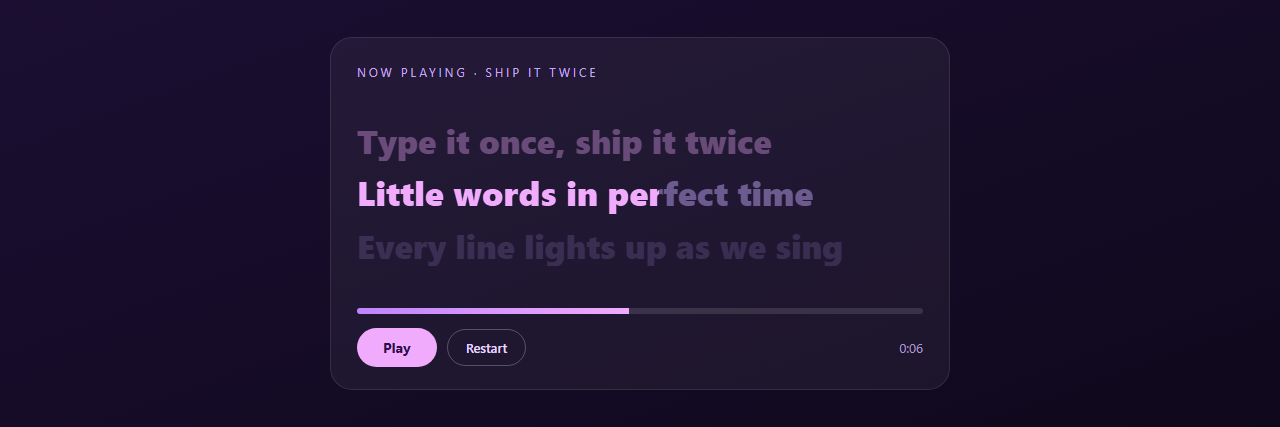
Karaoke, lyric videos and read-along captions all share one idea: the word you should be saying right now is lit, and the lit area sweeps across it at the pace it's spoken. This snippet builds that from a simple data table, not a video. Each word has a start time and a length, and a single requestAnimationFrame loop turns the elapsed time into a fill amount for every word.
A word is a two-colour gradient you slide
Each word's background is linear-gradient(90deg, light 50%, dim 50%) sized to 200% width and clipped to the text. Moving background-position from 100% to 0% slides the bright half across the word like a wipe. Because the fill is a position, not a width, it works for words of any length and any font with no measuring.
One clock, one render function
The loop adds the delta of each animation frame to t, and render() computes every word's progress as (t − start) / length, clamped between 0 and 1. The same function updates the active line (brightened and scaled a little), the progress bar and the m:ss readout. Pausing just stops requesting frames; restarting sets t to zero. Because the display is a pure function of t, you can bolt on seeking, a scrubber or a real <audio> element by setting t = audio.currentTime.
Data, not markup
Lyrics live in a plain array of [text, start, length], which is easy to generate from subtitle files or a timing tool. The progress bar has a proper progressbar role with a live value, the lyric container isn't a live region (it would be too chatty), and reduced-motion visitors get all lines lit and no animation.
Step by step
How to Use
- 1Paste the three blocksA dark player card appears with three lyric lines, a progress bar and Play / Restart buttons. Press Play and the words fill in order, with the current line brightened.
- 2Write your own linesEdit the
SONGarray. Each line is a list of[word, startSeconds, lengthSeconds]. Keep the start times ascending and updateENDto the last end time plus a little. - 3Sync to real audioAdd an
<audio>element and, instead of adding frame deltas tot, sett = audio.currentTimein the loop. Pause and play the audio from the same buttons. - 4Recolour the fillChange the two gradient colours on
.wordfor the lit and unlit halves, and the progress bar gradient to match. - 5Use it for captionsSwap the lyrics for subtitle text with word timings to get read-along captions for a video or podcast clip.
Real-world uses
Common Use Cases
Got questions?
Frequently Asked Questions
For lyrics, tap them out with a small timing tool or use an audio editor's markers. For speech, transcription services return word-level timestamps you can convert to this array format.
It runs in step with the display and pauses in background tabs. Using the frame delta also avoids drift, because progress is computed from elapsed time, not counted ticks.
Yes: add a click handler on each word that sets t = word.start and calls render(). Because rendering depends only on t, no other state needs fixing.
Yes in all current browsers; Safari needs the -webkit- prefix, which is included. The text colour is transparent so the gradient shows through.