



Redline Edit Replace — Strikethrough and Rewrite Animation
Redline Edit Replace · Text Animation · Plain HTML, CSS & JS · Live preview
Copy & paste
Source Code
<main class="desk">
  <div class="doc">
    <div class="doc-bar"><span class="dot"></span><span class="dot"></span><span class="dot"></span><span class="doc-name">proposal-v3.docx · Track changes on</span></div>
    <p class="body" id="body" aria-live="polite">
      We build <span class="edit"><span class="old">cheap</span><span class="ins"></span></span> websites for
      <span class="edit"><span class="old">everyone</span><span class="ins"></span></span> and ship them in
      <span class="edit"><span class="old">a few months</span><span class="ins"></span></span>, with
      <span class="edit"><span class="old">okay</span><span class="ins"></span></span> support after launch.
    </p>
    <div class="legend"><span><i class="k del"></i>Deleted</span><span><i class="k add"></i>Inserted</span><button type="button" class="replay" id="replay">Replay edits</button></div>
  </div>
</main>*{box-sizing:border-box;margin:0;padding:0}
body{min-height:100vh;display:grid;place-items:center;background:#e9edf3;font-family:system-ui,sans-serif}
.desk{width:100%;padding:24px 16px;display:grid;place-items:center}
.doc{width:min(680px,100%);background:#fff;border-radius:12px;box-shadow:0 20px 50px rgba(20,30,60,.18);overflow:hidden}
.doc-bar{display:flex;align-items:center;gap:6px;padding:10px 14px;background:#f3f5f9;border-bottom:1px solid #e1e6ef}
.dot{width:10px;height:10px;border-radius:50%;background:#cbd3e1}
.doc-name{margin-left:10px;font-size:12px;color:#6b7690}
.body{padding:36px 34px 26px;font:400 clamp(20px,3.4vw,28px)/1.9 Georgia,'Times New Roman',serif;color:#1f2a44}
.edit{position:relative;white-space:nowrap}
.old{position:relative;display:inline-block;vertical-align:top;overflow:hidden;transition:color .3s,max-width .5s ease,opacity .4s}
.old::after{content:"";position:absolute;left:0;top:56%;height:2px;width:0;background:#e11d48;transition:width .45s ease-out}
.edit.struck .old{color:#e11d48}
.edit.struck .old::after{width:100%}
.ins{display:inline-block;color:#16a34a;font-weight:700;border-bottom:2px solid #16a34a;max-width:0;overflow:hidden;vertical-align:top;white-space:nowrap;transition:max-width .6s ease}
.edit.typing .ins{max-width:14em;margin-left:6px}
.edit.accepted .old{max-width:0;opacity:0}
.edit.accepted .ins{color:inherit;font-weight:400;border-bottom-color:transparent;margin-left:0}
.legend{display:flex;align-items:center;gap:18px;padding:12px 34px 18px;font-size:12px;color:#6b7690}
.legend .k{display:inline-block;width:14px;height:3px;margin-right:7px;vertical-align:middle;border-radius:2px}
.k.del{background:#e11d48}.k.add{background:#16a34a}
.replay{margin-left:auto;font:600 12px system-ui,sans-serif;color:#1f2a44;background:#eef2f9;border:1px solid #d4dcec;border-radius:8px;padding:7px 14px;cursor:pointer}
.replay:focus-visible{outline:2px solid #2563eb;outline-offset:2px}
@media (prefers-reduced-motion:reduce){.old,.old::after,.ins{transition:none}}var edits = Array.prototype.slice.call(document.querySelectorAll('.edit'));
var NEW_TEXT = ['affordable', 'growing local businesses', 'six weeks', 'ongoing'];
var timers = [];
var reduce = window.matchMedia('(prefers-reduced-motion: reduce)').matches;
function later(fn, ms) { timers.push(setTimeout(fn, ms)); }
function reset() {
timers.forEach(clearTimeout);
timers = [];
edits.forEach(function (ed) {
ed.classList.remove('struck', 'typing', 'accepted');
ed.querySelector('.ins').textContent = '';
});
}
function typeInto(el, text, done) {
var i = 0;
(function step() {
el.textContent = text.slice(0, ++i);
if (i < text.length) later(step, 45); else done();
})();
}
function run() {
reset();
var t = 600;
edits.forEach(function (ed, i) {
var ins = ed.querySelector('.ins');
later(function () { ed.classList.add('struck'); }, t); // 1. red line strikes the old word
later(function () { // 2. the new word is typed in beside it
ed.classList.add('typing');
typeInto(ins, NEW_TEXT[i], function () { later(function () { ed.classList.add('accepted'); }, 700); }); // 3. accept: old collapses
}, t + 650);
t += 650 + NEW_TEXT[i].length * 45 + 1500;
});
}
document.getElementById('replay').addEventListener('click', run);
if (reduce) {
edits.forEach(function (ed, i) { ed.querySelector('.ins').textContent = NEW_TEXT[i]; ed.classList.add('typing', 'accepted'); });
} else {
run();
}Extend with AI
Take This Snippet Further With AI
Ask an AI coding assistant to explain why the collapsing of the old word uses max-width and opacity instead of display none, and how storing every setTimeout in an array lets the replay button cancel a half-finished sequence safely. It's worth asking how you'd restructure the schedule using promises or async/await.
Prompt to recreate it
Copy this into your AI assistant of choice to build the effect from scratch, or as a jumping-off point for your own variant:
Build a "tracked changes" text animation in plain HTML, CSS and JavaScript where words in a sentence get struck through and rewritten one edit at a time.

Requirements:
- A document card with a toolbar-style header and a paragraph containing four edit groups. Each group has an .old word and an empty .ins span.
- Phase 1: add a struck class that grows a red line across the old word (a ::after pseudo-element animating width) and turns it red.
- Phase 2: add a typing class that opens the .ins span with a max-width transition while JavaScript types the replacement text one letter at a time; the inserted text is green with an underline.
- Phase 3: add an accepted class that collapses the old word (max-width to 0 and opacity to 0) and returns the new text to the normal colour with no underline, so the sentence reflows smoothly.
- Schedule all steps through a helper that stores every timeout, so a "Replay edits" button can clear them and restart without overlap.
- Make the paragraph an aria-live polite region, and under prefers-reduced-motion show the final accepted sentence immediately with no transitions.
Want to tighten it up first? Run this prompt through the AI Prompt Studio to score it across 8 quality dimensions, catch anti-patterns, and tune the wording for Claude, ChatGPT, or Gemini before you paste it in.
What's included
Features
::after rule grows across the old word, so the cut is drawn rather than switched on.max-width transitions, so the sentence closes up gracefully.About this UI Snippet
Redline Edit Replace — Strike, Type, Accept: A Tracked-Changes Text Animation
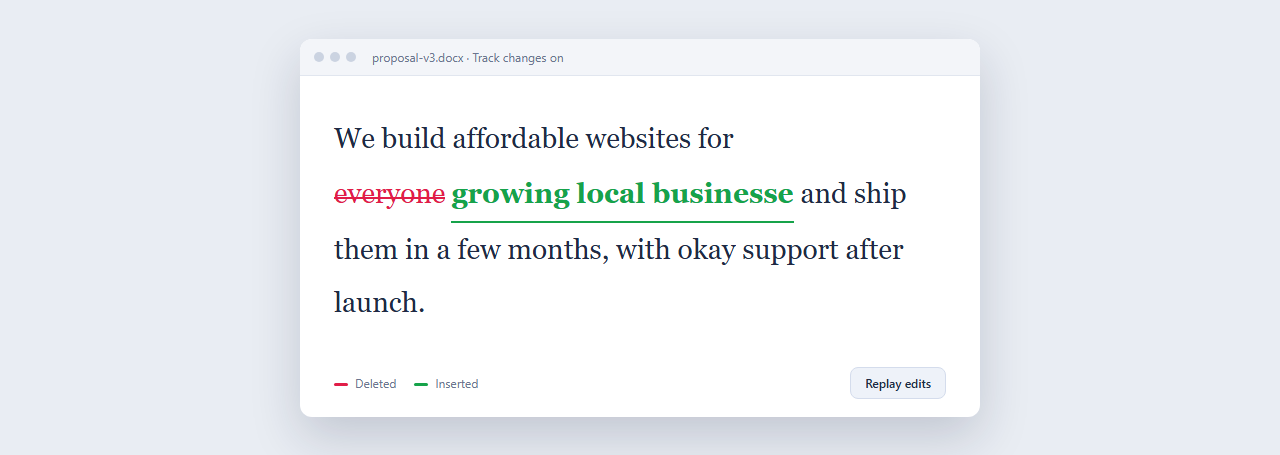
Everyone recognises the visual language of an edit: red strikethrough on the word that goes, green on the word that replaces it. This snippet animates that whole workflow as a sentence rewrites itself, four edits in sequence. It's useful because it tells a story with text alone: "this is how we're making your words better".
Three phases per edit
Each edit is a small group: an .old word and an empty .ins placeholder. In the first phase the group gets struck, which grows a red line from 0 to full width through a ::after pseudo-element and turns the word red. In the second phase typing opens the .ins container (a max-width transition from 0) while JavaScript types the replacement one letter at a time. In the third, accepted collapses the old word to zero width and fades it, and the new word loses its green underline and returns to normal text colour, as if you'd accepted the change.
Why max-width, not display
display:none can't be transitioned. Animating max-width from 0 to a generous 14em (and from the word's width back to 0 for the old word) lets the sentence reflow smoothly as words appear and disappear, with the text after the edit sliding into place rather than jumping.
A cancellable timeline
All the steps are scheduled through one later() helper that stores each timer, so "Replay edits" can clear everything mid-sequence and start fresh with no overlapping animations. The paragraph is an aria-live region so assistive tech hears the finished sentence, and reduced-motion visitors see the final, accepted version immediately.
Step by step
How to Use
- 1Paste the three blocksA white document window appears and four words in the sentence are struck through and rewritten in turn, ending with the clean final sentence.
- 2Write your own sentenceEdit the paragraph and wrap each word you want to change in
<span class="edit"><span class="old">…</span><span class="ins"></span></span>. - 3Set the replacementsUpdate
NEW_TEXTin the JavaScript so there is one replacement string for each edit, in order. - 4Tune the timingTyping speed is the
45(ms per letter). The650before typing and the1500after each edit set the pause. Raise them for a calmer read. - 5Re-colour the marksRed is
#e11d48and green is#16a34a. Change them (and the legend swatches) to match your brand or a darker background.
Real-world uses
Common Use Cases
Got questions?
Frequently Asked Questions
Add another .edit group in the paragraph and one more string at the end of NEW_TEXT. The script reads every .edit in order and the timing accumulates, so no other change is needed.
The old word needs a measurable width to animate from. It must be display:inline-block with an explicit max-width transition. If you changed it to inline, the collapse becomes instant.
Yes. Remove the direct run() call and trigger it from an IntersectionObserver, as other scroll-triggered snippets here do.
Yes: leave out the accepted step, or make it only turn the old word grey. That produces a permanent "before and after" view.