

Screen Orientation Lock Toggle — Free screen.orientation.lock() UI
Screen Orientation Lock Toggle · Buttons · Plain HTML, CSS & JS · Live preview
What's included
Features
About this UI Snippet
Screen Orientation Lock Toggle — Real Locking, Honest About Its Requirements
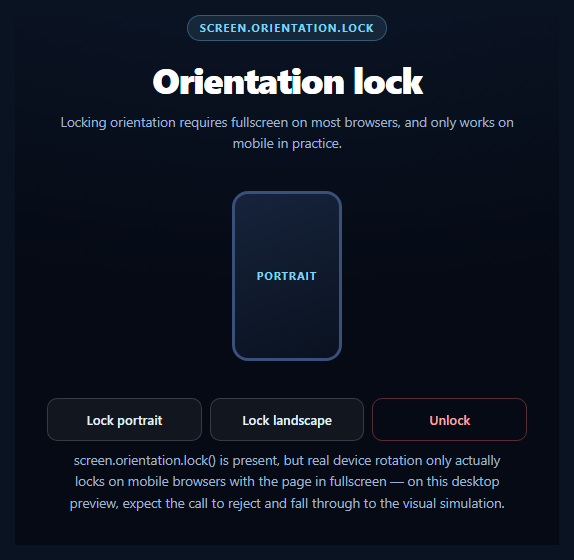
This snippet calls the genuine screen.orientation.lock() API rather than faking a toggle, and is upfront about the two conditions that make it fail on most desktop previews: the page usually must be in fullscreen first, and the browser must actually implement the method at all.
Fullscreen first, then lock
On Chromium and Firefox mobile, screen.orientation.lock('portrait') generally only resolves if the calling document (or an element within it) is currently in fullscreen — locking the orientation of a non-fullscreen tab makes little sense to the browser, since the rest of the OS chrome would still rotate freely. This snippet checks document.fullscreenElement and calls requestFullscreen() first when needed, exactly mirroring what a production implementation must do.
Desktop rejects, and that's expected
Even with fullscreen granted, most desktop browsers reject orientation.lock() outright (commonly with a SecurityError or NotSupportedError) because there's no physical screen orientation to lock — a monitor doesn't rotate. iOS Safari goes further and never implements screen.orientation.lock at all. The snippet's try/catch treats every rejection as an expected, named outcome rather than a bug, and falls into a clearly-labeled simulated mode.
A device mockup that stays honest
Rather than silently no-op, the demo drives a small device-frame mockup that visually reflects whichever orientation was requested — portrait or landscape — regardless of whether the real lock succeeded. The status line always states which happened: a genuine screen.orientation.lock() resolution, or a simulated visual-only fallback with the specific rejection reason named.
Unlocking cleans up both states
The Unlock button calls screen.orientation.unlock() when supported and also exits fullscreen if the demo entered it, so the page doesn't strand the user in a fullscreen view they didn't explicitly ask to stay in.
Pair this with a screen wake lock toggle for another honest hardware-adjacent capability toggle, or a pull to refresh pattern for more mobile-first interaction.
Step by step
How to Use
- 1Paste HTML, CSS, and JSA device mockup and three action buttons render.
- 2Click "Lock portrait" or "Lock landscape"The demo requests fullscreen, then calls orientation.lock().
- 3Watch the status lineIt reports a real lock, or names why it fell back to simulation.
- 4Try it on a mobile browserChromium/Firefox mobile in fullscreen can genuinely lock rotation.
- 5Click UnlockReverses the lock and exits fullscreen if it was entered.
- 6Read the noteExplains the fullscreen requirement and platform gaps upfront.
Real-world uses
Common Use Cases
NotSupportedError when the lock fails.Got questions?
Frequently Asked Questions
Most browsers that implement screen.orientation.lock() (primarily Chromium and Firefox on mobile) only honor the call while the document is in fullscreen. The reasoning is that locking a normal browser tab's orientation would fight the rest of the OS and browser chrome, which still needs to rotate freely — fullscreen removes that conflict. This snippet checks document.fullscreenElement and requests fullscreen automatically before attempting the lock.
Desktop monitors don't physically rotate, so most desktop browsers reject screen.orientation.lock() outright, typically with a SecurityError or NotSupportedError even inside fullscreen. This is expected, not a bug — the snippet's catch block treats it as a named, expected outcome and falls back to a visual-only simulation on the on-screen device mockup so the demo still communicates intent.
No. iOS Safari has never implemented screen.orientation.lock — the property may exist for reading current orientation, but calling .lock() is unsupported. This snippet feature-detects with typeof screen.orientation.lock === 'function' and, when absent, runs the same visual simulation it uses for any other rejection, so the demo degrades gracefully rather than throwing.
It's safe — screen.orientation.unlock() and exiting fullscreen are both no-ops (or simply reset state) if nothing was locked or no fullscreen session is active. The button also resets the on-screen device mockup back to its default portrait state regardless of whether a real lock had occurred.
Wrap the fullscreen-then-lock sequence in an async handler, guard every native call in try/catch, and drive the device mockup's orientation from component state rather than direct DOM classes. Listen for the fullscreenchange event to sync your state if the user exits fullscreen manually (e.g. pressing Escape), since that can happen outside your own Unlock button.
Build with AI
Build, Understand, Optimize, and Extend It With AI
Paste this snippet's HTML, CSS, and JS into an AI coding assistant like Claude and ask it to explain why screen.orientation.lock() generally requires the document to be in fullscreen first on the browsers that implement it, and why desktop browsers reject the call even inside fullscreen. It's useful for reasoning about graceful degradation more broadly — ask how the same try/catch-into-simulation pattern used here compares to the microphone fallback in a Web Audio demo, and whether the specific error names (SecurityError, NotSupportedError) are worth branching on differently. For extensions, ask it to add a fullscreenchange listener that syncs the UI if the user exits fullscreen with Escape, support locking to a more specific orientation like landscape-primary versus landscape-secondary, or persist the last-requested orientation preference. Treat the code less like a finished artifact and more like a starting point for a conversation.
Prompt to recreate it
Copy this into your AI assistant of choice to build the effect from scratch, or as a jumping-off point for your own variant:
Build a "screen orientation lock toggle" in plain HTML, CSS, and JavaScript using the real Screen Orientation API (screen.orientation.lock/.unlock) — no libraries.

Requirements:
- A small device-frame mockup element that visually switches between a portrait and landscape aspect ratio via a CSS transition, plus three buttons: "Lock portrait", "Lock landscape", and "Unlock".
- Feature-detect support with something like screen.orientation && typeof screen.orientation.lock === 'function' before ever calling it, since this API is entirely absent on iOS Safari and many desktop browsers.
- CRITICAL: most browsers that implement orientation locking only honor screen.orientation.lock() while the document (or an element) is in fullscreen. Before attempting a lock, check document.fullscreenElement and, if not already in fullscreen, call requestFullscreen() on a container element and await it, all wrapped in try/catch since requestFullscreen can itself be rejected (e.g. no user gesture, or a sandboxed iframe missing the fullscreen allow attribute).
- CRITICAL: wrap the actual await screen.orientation.lock(mode) call in try/catch. On real desktop browsers this call very commonly rejects (no physical orientation to lock) even inside fullscreen — treat this as an expected, common outcome, not an error state, and fall back to a clearly-labeled simulated mode where the device mockup still visually reflects the requested orientation, with status text naming the specific rejection (err.name) so the user understands why.
- An Unlock button that calls screen.orientation.unlock() when supported, exits fullscreen if it was entered by this demo, and resets the device mockup to its default state.
- Status text must plainly state whether a real hardware/browser-level lock is in effect, versus a simulated visual-only lock, and briefly explain that real locking only works in practice on mobile browsers with fullscreen active — desktop previews should expect to see the simulated path.
Want to tighten it up first? Run this prompt through the AI Prompt Studio to score it across 8 quality dimensions, catch anti-patterns, and tune the wording for Claude, ChatGPT, or Gemini before you paste it in.
Source Code
<section class="sol-wrap">
  <span class="sol-tag">screen.orientation.lock</span>
  <h1>Orientation lock</h1>
  <p id="solStatus">Locking orientation requires fullscreen on most browsers, and only works on mobile in practice.</p>

  <div class="sol-device" id="solDevice">
    <div class="sol-device-frame" id="solFrame">
      <span class="sol-device-label" id="solLabel">portrait</span>
    </div>
  </div>

  <div class="sol-actions">
    <button class="sol-btn" id="solPortrait">Lock portrait</button>
    <button class="sol-btn" id="solLandscape">Lock landscape</button>
    <button class="sol-btn ghost" id="solUnlock">Unlock</button>
  </div>

  <p class="sol-note" id="solNote">Checking Screen Orientation API support…</p>
</section>*{box-sizing:border-box;margin:0;padding:0}
body{font-family:system-ui,-apple-system,sans-serif;background:radial-gradient(120% 90% at 50% 0%,#0e1a2e,#050a14 60%);color:#fff;min-height:100vh;display:flex;align-items:center;justify-content:center;padding:26px}
.sol-wrap{width:100%;max-width:480px;text-align:center}
.sol-tag{display:inline-block;font-size:10.5px;font-weight:700;letter-spacing:.14em;text-transform:uppercase;color:#7dd3fc;background:rgba(125,211,252,.1);border:1px solid rgba(125,211,252,.3);padding:5px 12px;border-radius:99px;margin-bottom:14px}
.sol-wrap h1{font-size:clamp(26px,6vw,36px);font-weight:800;letter-spacing:-.03em}
.sol-wrap p{font-size:13.5px;color:#9fb3cc;margin-top:8px;line-height:1.6}
.sol-device{display:flex;align-items:center;justify-content:center;height:200px;margin:22px 0}
.sol-device-frame{width:110px;height:170px;border-radius:16px;border:3px solid #38507a;background:linear-gradient(160deg,#16233b,#0a1220);display:flex;align-items:center;justify-content:center;transition:width .35s cubic-bezier(.34,1.56,.64,1),height .35s cubic-bezier(.34,1.56,.64,1)}
.sol-device-frame.landscape{width:170px;height:110px}
.sol-device-label{font-size:11px;font-weight:700;letter-spacing:.08em;text-transform:uppercase;color:#7dd3fc}
.sol-actions{display:flex;gap:8px;flex-wrap:wrap;justify-content:center}
.sol-btn{flex:1;min-width:110px;padding:12px;border-radius:10px;border:1px solid rgba(255,255,255,.16);background:rgba(255,255,255,.05);color:#e5f0fb;font:600 13px system-ui;cursor:pointer;transition:background .15s}
.sol-btn:hover{background:rgba(255,255,255,.11)}
.sol-btn.ghost{background:transparent;border-color:rgba(248,113,113,.35);color:#fca5a5}
.sol-btn.ghost:hover{background:rgba(248,113,113,.1)}
.sol-note{font-size:11.5px;color:#7288a6;max-width:440px;margin:16px auto 0;line-height:1.6}var statusEl = document.getElementById('solStatus');
var noteEl = document.getElementById('solNote');
var frameEl = document.getElementById('solFrame');
var labelEl = document.getElementById('solLabel');
var portraitBtn = document.getElementById('solPortrait');
var landscapeBtn = document.getElementById('solLandscape');
var unlockBtn = document.getElementById('solUnlock');
var deviceEl = document.getElementById('solDevice');
// The real Screen Orientation API. Locking generally requires the document
// (or an element) to be in fullscreen first in Chromium/Firefox on mobile;
// desktop browsers largely refuse orientation.lock() outright since there's
// no physical orientation to lock, and iOS Safari has never implemented
// screen.orientation.lock at all.
var hasOrientationAPI = !!(screen.orientation && typeof screen.orientation.lock === 'function');
var hasFullscreenAPI = !!(document.documentElement.requestFullscreen);
function setVisual(mode) {
frameEl.classList.toggle('landscape', mode === 'landscape');
labelEl.textContent = mode;
}
function simulateLock(mode, reason) {
setVisual(mode);
statusEl.textContent = 'Simulated ' + mode + ' lock (' + reason + ') — the device mockup above reflects the requested state visually.';
}
async function attemptLock(mode) {
if (!hasOrientationAPI) {
simulateLock(mode, 'Screen Orientation API unsupported here — likely iOS Safari or an older browser');
return;
}
try {
// Most implementations require fullscreen active on the locking element
// before orientation.lock() will resolve rather than reject.
if (hasFullscreenAPI && !document.fullscreenElement) {
statusEl.textContent = 'Requesting fullscreen (required by most browsers before an orientation lock is honored)…';
await deviceEl.requestFullscreen();
}
await screen.orientation.lock(mode);
setVisual(mode);
statusEl.textContent = 'Locked to ' + mode + ' via screen.orientation.lock("' + mode + '"). On desktop this call very commonly rejects — see below.';
} catch (err) {
// Extremely common: desktop browsers, non-fullscreen contexts, or a
// sandboxed preview iframe without an "allow" for orientation-lock all
// reject this promise (typically SecurityError or NotSupportedError).
simulateLock(mode, (err && err.name ? err.name : 'rejected') + ' — desktop browsers and non-fullscreen contexts commonly refuse real locks');
}
}
portraitBtn.addEventListener('click', function () { attemptLock('portrait'); });
landscapeBtn.addEventListener('click', function () { attemptLock('landscape'); });
unlockBtn.addEventListener('click', function () {
if (hasOrientationAPI) {
try { screen.orientation.unlock(); } catch (err) {}
}
if (document.fullscreenElement) {
try { document.exitFullscreen(); } catch (err) {}
}
setVisual('portrait');
statusEl.textContent = 'Unlocked. Orientation now follows the device\'s natural rotation again.';
});
if (hasOrientationAPI) {
noteEl.textContent = 'screen.orientation.lock() is present, but real device rotation only actually locks on mobile browsers with the page in fullscreen — on this desktop preview, expect the call to reject and fall through to the visual simulation.';
} else {
noteEl.textContent = 'screen.orientation.lock is not available in this browser (iOS Safari never implemented it; many desktop browsers omit it entirely). Buttons still animate the device mockup so the intended behavior stays visible.';
}