


App Splash Screen — Free Launch Loading UI Snippet
App Splash Screen · Mobile · Plain HTML, CSS & JS · Live preview
Copy & paste
Source Code
<div class="sp-phone">
  <div class="sp-screen" id="spScreen">
    <div class="sp-center">
      <div class="sp-logo">
        <svg viewBox="0 0 64 64" width="72"><circle class="sp-ring" cx="32" cy="32" r="26"/><path class="sp-tick" d="M22 33l7 7 14-16"/></svg>
      </div>
      <h1 class="sp-name">Cobalt</h1>
      <div class="sp-load"><span class="sp-fill" id="spFill"></span></div>
      <p class="sp-status" id="spStatus">Starting up…</p>
    </div>
    <div class="sp-foot">v2.4.0 · © Cobalt Labs</div>
  </div>
  <button type="button" class="sp-replay" id="spReplay">Replay</button>
</div>*{box-sizing:border-box;margin:0;padding:0}
body{font-family:system-ui,-apple-system,sans-serif;background:#1e293b;display:flex;flex-direction:column;justify-content:center;align-items:center;min-height:100vh;padding:24px}
.sp-phone{width:280px;height:580px;background:#0b1220;border-radius:46px;padding:12px;box-shadow:0 30px 60px -20px rgba(0,0,0,.6),inset 0 0 0 2px #1e293b}
.sp-screen{position:relative;width:100%;height:100%;border-radius:34px;overflow:hidden;background:linear-gradient(160deg,#4f46e5,#7c3aed 55%,#0f172a);color:#fff;display:flex;flex-direction:column;align-items:center;justify-content:center}
.sp-center{display:flex;flex-direction:column;align-items:center;animation:spRise .7s cubic-bezier(.22,1,.36,1) both}
@keyframes spRise{from{opacity:0;transform:translateY(14px)}}
.sp-logo{width:88px;height:88px;border-radius:26px;background:rgba(255,255,255,.14);backdrop-filter:blur(6px);display:flex;align-items:center;justify-content:center;margin-bottom:20px;box-shadow:0 18px 40px -16px rgba(0,0,0,.6)}
.sp-ring{fill:none;stroke:#fff;stroke-width:4;stroke-dasharray:164;stroke-dashoffset:164;animation:spDraw 1s ease forwards .2s}
.sp-tick{fill:none;stroke:#fff;stroke-width:5;stroke-linecap:round;stroke-linejoin:round;stroke-dasharray:40;stroke-dashoffset:40;animation:spDraw .5s ease forwards 1s}
@keyframes spDraw{to{stroke-dashoffset:0}}
.sp-name{font-size:26px;font-weight:800;letter-spacing:.5px;margin-bottom:24px}
.sp-load{width:160px;height:5px;border-radius:3px;background:rgba(255,255,255,.22);overflow:hidden}
.sp-fill{display:block;height:100%;width:0;background:#fff;border-radius:3px;transition:width .25s ease}
.sp-status{font-size:12px;opacity:.85;margin-top:12px;font-weight:600;min-height:16px}
.sp-foot{position:absolute;bottom:26px;font-size:10px;opacity:.6}
.sp-replay{margin-top:20px;background:#1e293b;color:#fff;border:none;border-radius:9px;padding:9px 18px;font-size:12.5px;font-weight:700;cursor:pointer;font-family:inherit}
.sp-replay:hover{background:#334155}var fill = document.getElementById('spFill');
var status = document.getElementById('spStatus');
var center = document.querySelector('.sp-center');
var STEPS = [
{ p: 25, t: 'Loading assets…' },
{ p: 55, t: 'Restoring session…' },
{ p: 82, t: 'Syncing data…' },
{ p: 100, t: 'Ready' }
];
var timer = null;
function run() {
var i = 0;
fill.style.width = '0%';
status.textContent = 'Starting up…';
clearInterval(timer);
timer = setInterval(function () {
if (i >= STEPS.length) {
clearInterval(timer);
// Fade the splash out once loading completes, like handing off to the app.
center.style.transition = 'opacity .4s, transform .4s';
center.style.opacity = '0';
center.style.transform = 'scale(1.08)';
setTimeout(function () { center.style.transition = 'none'; center.style.opacity = ''; center.style.transform = ''; }, 600);
return;
}
fill.style.width = STEPS[i].p + '%';
status.textContent = STEPS[i].t;
i++;
}, 750);
}
document.getElementById('spReplay').addEventListener('click', run);
run();Extend with AI
Take This Snippet Further With AI
The AI prompt for this one is for Patreon supporters ($3 a month), along with a site with no ads. Supporters enter the passcode once and it is remembered in this browser.
What's included
Features
About this UI Snippet
App Splash Screen — Animated Launch Loading Screen
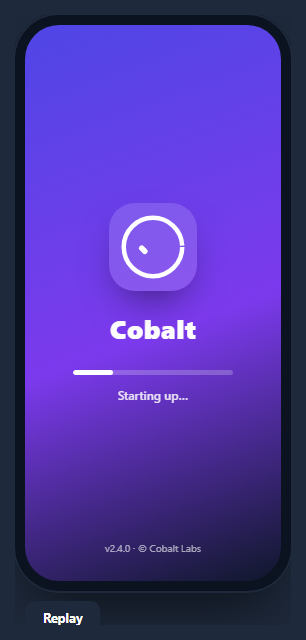
A splash screen is the branded launch screen an app shows while it boots — a centered logo, the app name, and often a progress indicator that fills as assets load. This snippet builds a polished one inside a CSS phone frame, with a self-drawing SVG logo, a staged progress bar with changing status text, and a fade-out hand-off, in HTML, CSS, and vanilla JavaScript with no dependency.
A logo that draws itself
The logo animates on with the stroke-dasharray line-drawing technique: the ring's stroke-dasharray equals its circumference and its stroke-dashoffset starts fully offset (invisible), then animates to 0 so the circle draws clockwise; the checkmark follows with its own delayed draw. Layered over a frosted, rounded badge, it gives a premium "assembling" entrance with no images — just two SVG paths and keyframes.
Staged progress, not a fake bar
Rather than a meaningless looping animation, the progress reflects discrete boot stages held in a STEPS array — "Loading assets", "Restoring session", "Syncing data", "Ready" — each with a target percentage and label. An interval advances through them, growing the fill (transitioned for smoothness) and updating the status line, so it reads like a real startup sequence. In production you'd advance a stage as each real task resolves instead of on a timer.
The fade-out hand-off
When loading completes, the splash content fades and scales up slightly before resetting — simulating the transition where a splash dismisses and reveals the app. This dismissal is the defining moment of a splash screen, and animating it (rather than cutting) makes the launch feel smooth.
Entrance and layout
The whole center block rises and fades in with a spRise keyframe on load, the background is a rich gradient, and a version/copyright line is pinned to the bottom — the conventional splash layout. Everything is centered with flexbox inside the device frame.
Reusing it
Swap the logo, name, and gradient for your brand, and drive the progress from real load events by calling the stage advance as each resource finishes. Lift it out of the phone frame to use as a web app's initial loading screen, or keep it framed beside a phone mockup for store assets.
Step by step
How to Use
- 1Paste HTML, CSS, and JSA splash screen renders inside a phone frame and starts loading.
- 2Watch the logo drawThe ring and checkmark draw themselves on load.
- 3Follow the progressThe bar advances through staged status messages.
- 4See the hand-offAt 100% the splash fades and scales out.
- 5Replay itClick Replay to run the launch sequence again.
- 6Drive real loadingAdvance a stage as each real boot task resolves.
Real-world uses
Common Use Cases
stroke-dasharray, shown inside a phone mockup.Got questions?
Frequently Asked Questions
It uses the stroke-dasharray line-drawing technique. The ring's dash array equals its circumference and its dash offset starts fully offset so nothing shows, then a keyframe animates the offset to zero, drawing the circle. The checkmark has its own delayed draw. Two SVG paths and keyframes produce the assembling entrance with no images.
It models discrete boot stages from a STEPS array — loading assets, restoring session, syncing data, ready — each with a target percentage and status label. An interval advances through them. It's a realistic startup sequence, and in a real app you'd advance a stage as each actual task completes rather than on a timer.
When loading reaches the final stage, the splash content fades its opacity and scales up slightly before resetting, simulating the moment a splash screen dismisses to reveal the app. Animating the hand-off instead of cutting abruptly makes the launch feel smooth and intentional.
Yes. The phone frame is just a wrapper; the splash content is independent. Lift it out and show it as your web app's initial loading screen, then remove it once your app has hydrated. Drive the progress from real readiness events for an accurate bar.
Render it while an isLoading flag is true and unmount it when your data and assets are ready. Replace the timer with stage advances tied to real promises resolving, updating progress in state. Put the fade-out on the unmount transition. In Tailwind, center with flex, build the bar from a track and a width-bound fill, and animate the SVG with a small style block.