



Three-Way Theme Toggle Switch — Free HTML CSS JS Snippet
Three-Way Theme Toggle Switch · Buttons · Plain HTML, CSS & JS · Live preview
What's included
Features
About this UI Snippet
Three-Way Theme Toggle Switch — Light / Dark / System Segmented Control
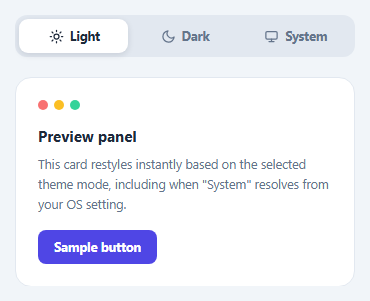
Most theme toggles are a simple two-state switch, but a "System" option — deferring to the operating system's preference — is what most production apps actually ship. This snippet implements a three-way segmented control (Light / Dark / System) with a sliding highlight behind the active option, wired to a live preview panel that restyles through CSS custom properties.
The sliding highlight
.tt-highlight is a single absolutely-positioned element sized to one-third of the segmented control's width. Selecting an option translates it via transform: translateX(index * 100%), animated with a CSS transition — a cheap, GPU-accelerated slide rather than re-rendering separate active backgrounds for each button.
Resolving "System" at selection time
Choosing "System" doesn't set a fixed theme; resolveSystemTheme() checks window.matchMedia('(prefers-color-scheme: dark)').matches at the moment of selection to decide whether the preview should currently look light or dark. A change listener on that same media query re-resolves the theme live if the OS preference changes while "System" is still selected — the preview updates without requiring the user to click anything again.
CSS custom properties drive the actual restyle
The preview panel defines its light-mode colors as CSS custom properties (--tt-surface, --tt-text, --tt-border, --tt-muted) directly on .tt-preview, then overrides all four inside a [data-theme="dark"] attribute selector scoped to the same element. Every color used inside the panel — background, text, borders, muted copy — reads from these variables, so setting one attribute (data-theme) is enough to restyle the entire panel consistently.
Step by step
How to Use
- 1Load the snippetClick "Three-Way Theme Toggle Switch" in the sidebar to load its HTML, CSS, and JS into the editor panels. The preview updates instantly.
- 2Edit the codeModify any panel — HTML, CSS, or JS. The preview refreshes as you type. Use Reset in each panel header to restore the original.
- 3Preview on devicesClick the Mobile (375px), Tablet (768px), or Desktop buttons in the preview header to check responsiveness.
- 4Export in your formatClick "HTML" to download a standalone file, "JSX" for a React component, "Tailwind" for a React + Tailwind CSS component, "Tailwind HTML" for a standalone HTML file with Tailwind CDN, "Vue" for a Vue 3 SFC with <template>/<script setup>/<style scoped>, or "Angular" for a standalone Angular .component.ts file. "Copy all" copies the full code to clipboard.
- 5Save your versionClick "Save as", type a name, and press Enter. Your snippet saves to IndexedDB and appears in the Saved tab.
Real-world uses
Common Use Cases
window.matchMedia, and re-resolves if the operating system preference changes while selected.data-theme attribute lets one set of component styles work in every theme.Got questions?
Frequently Asked Questions
It reads window.matchMedia("(prefers-color-scheme: dark)").matches at the moment System is selected. If the OS preference changes afterward while System is still active, a change listener on that same media query re-resolves and reapplies the theme automatically.
A single absolutely-positioned element sized to one-third the control's width is translated horizontally by a multiple of 100% of its own width based on the selected option's index, animated with a CSS transition on transform.
All of its colors are CSS custom properties defined on .tt-preview. A [data-theme="dark"] attribute selector scoped to the same element redefines those properties; toggling the attribute is the only change needed to restyle everything inside it.
Yes — add another .tt-option button and adjust the highlight width percentage and translateX multiplier to match the new number of options, plus a corresponding CSS custom property override block.
Build with AI
Build, Understand, Optimize, and Extend It With AI
Hand this snippet's HTML, CSS, and JavaScript to an AI coding assistant like Claude and ask it to adapt "Three-Way Theme Toggle Switch" to your project — restyle it to match your design system, wire it up to real data instead of the static example, or port it to the framework you're building in.
Prompt to recreate it
Copy this into your AI assistant of choice to build the effect from scratch, or as a jumping-off point for your own variant:
Build a buttons component called "Three-Way Theme Toggle Switch" using plain HTML, CSS, and vanilla JavaScript — no framework, no build step.

Requirements:
- Match the structure and behavior of the "Three-Way Theme Toggle Switch" snippet from the UI Snippets Library.
- Keep the markup semantic and the styling self-contained (no external dependencies beyond what the original snippet uses).
- Keep the JavaScript vanilla, with no framework runtime required.
- Make it easy to restyle via CSS custom properties or class overrides so it can be dropped into a real project.
Want to tighten it up first? Run this prompt through the AI Prompt Studio to score it across 8 quality dimensions, catch anti-patterns, and tune the wording for Claude, ChatGPT, or Gemini before you paste it in.
Source Code
<div class="tt-wrap">
  <div class="tt-segmented" id="ttSegmented">
    <div class="tt-highlight" id="ttHighlight"></div>
    <button class="tt-option tt-active" data-mode="light">
      <svg width="15" height="15" viewBox="0 0 24 24" fill="none" stroke="currentColor" stroke-width="2" stroke-linecap="round" stroke-linejoin="round"><circle cx="12" cy="12" r="4"/><path d="M12 2v2M12 20v2M4.9 4.9l1.4 1.4M17.7 17.7l1.4 1.4M2 12h2M20 12h2M4.9 19.1l1.4-1.4M17.7 6.3l1.4-1.4"/></svg>
      Light
    </button>
    <button class="tt-option" data-mode="dark">
      <svg width="15" height="15" viewBox="0 0 24 24" fill="none" stroke="currentColor" stroke-width="2" stroke-linecap="round" stroke-linejoin="round"><path d="M21 12.8A9 9 0 1111.2 3a7 7 0 009.8 9.8z"/></svg>
      Dark
    </button>
    <button class="tt-option" data-mode="system">
      <svg width="15" height="15" viewBox="0 0 24 24" fill="none" stroke="currentColor" stroke-width="2" stroke-linecap="round" stroke-linejoin="round"><rect x="3" y="4" width="18" height="12" rx="2"/><path d="M8 20h8M12 16v4"/></svg>
      System
    </button>
  </div>

  <div class="tt-preview" id="ttPreview" data-theme="light">
    <div class="tt-preview-header">
      <span class="tt-dot" style="background:#f87171"></span>
      <span class="tt-dot" style="background:#fbbf24"></span>
      <span class="tt-dot" style="background:#34d399"></span>
    </div>
    <h3>Preview panel</h3>
    <p>This card restyles instantly based on the selected theme mode, including when "System" resolves from your OS setting.</p>
    <button class="tt-preview-btn">Sample button</button>
  </div>
</div>
* { box-sizing: border-box; }
body { font-family: system-ui, -apple-system, sans-serif; background: #f1f5f9; margin: 0; min-height: 100vh; display: flex; align-items: center; justify-content: center; padding: 24px; }
.tt-wrap { width: 100%; max-width: 340px; }
.tt-segmented { position: relative; display: flex; background: #e2e8f0; border-radius: 12px; padding: 4px; margin-bottom: 20px; }
.tt-highlight { position: absolute; top: 4px; bottom: 4px; left: 4px; width: calc(33.333% - 4px); background: #fff; border-radius: 9px; box-shadow: 0 2px 6px rgba(15,23,42,0.12); transition: transform 0.25s cubic-bezier(0.32,0.72,0,1); z-index: 0; }
.tt-option { position: relative; z-index: 1; flex: 1; display: flex; align-items: center; justify-content: center; gap: 6px; border: none; background: none; padding: 9px 6px; font-size: 12.5px; font-weight: 700; color: #64748b; cursor: pointer; font-family: inherit; border-radius: 9px; }
.tt-option.tt-active { color: #1e293b; }
.tt-preview {
border-radius: 16px; padding: 22px; border: 1px solid var(--tt-border);
background: var(--tt-surface); color: var(--tt-text);
transition: background 0.2s, color 0.2s, border-color 0.2s;
--tt-surface: #ffffff; --tt-text: #1e293b; --tt-border: #e2e8f0; --tt-muted: #64748b;
}
.tt-preview[data-theme="dark"] { --tt-surface: #1e293b; --tt-text: #f1f5f9; --tt-border: #334155; --tt-muted: #94a3b8; }
.tt-preview-header { display: flex; gap: 6px; margin-bottom: 16px; }
.tt-dot { width: 10px; height: 10px; border-radius: 50%; }
.tt-preview h3 { margin: 0 0 8px; font-size: 15px; }
.tt-preview p { margin: 0 0 16px; font-size: 12.5px; line-height: 1.6; color: var(--tt-muted); }
.tt-preview-btn { background: #4f46e5; color: #fff; border: none; padding: 9px 16px; border-radius: 8px; font-weight: 700; font-size: 12.5px; cursor: pointer; font-family: inherit; }var segmented = document.getElementById('ttSegmented');
var highlight = document.getElementById('ttHighlight');
var preview = document.getElementById('ttPreview');
var options = Array.prototype.slice.call(segmented.querySelectorAll('.tt-option'));
function resolveSystemTheme() {
return window.matchMedia && window.matchMedia('(prefers-color-scheme: dark)').matches ? 'dark' : 'light';
}
function applyTheme(mode) {
var effective = mode === 'system' ? resolveSystemTheme() : mode;
preview.setAttribute('data-theme', effective);
}
function moveHighlight(index) {
highlight.style.transform = 'translateX(' + (index * 100) + '%)';
}
function selectMode(mode, index) {
options.forEach(function (opt) { opt.classList.remove('tt-active'); });
options[index].classList.add('tt-active');
moveHighlight(index);
applyTheme(mode);
}
options.forEach(function (opt, index) {
opt.addEventListener('click', function () {
selectMode(opt.dataset.mode, index);
});
});
if (window.matchMedia) {
window.matchMedia('(prefers-color-scheme: dark)').addEventListener('change', function () {
var activeOpt = segmented.querySelector('.tt-active');
if (activeOpt && activeOpt.dataset.mode === 'system') applyTheme('system');
});
}
selectMode('light', 0);