

Most website builders make the first ten minutes easy and everything after that hard. You drag a few blocks around, and then you find out the site only runs on their hosting, the code can’t be exported, the animations are a paid add-on and your work disappears the moment you stop paying. Hand-coding a site from scratch has the opposite problem: total control, but days of work before you have a decent hero section, a pricing table and a footer.
The free Website Builder on webdevpuneet.com sits in between. You start from one of 23 complete website templates or a blank page, build with 51 ready-made website sections (heroes, navbars, features, pricing, testimonials, FAQ, contact forms, footers and more), edit everything in your browser, add GSAP scroll animations such as horizontal scroll galleries, pinned stories and stacking cards, and then export clean HTML, CSS and JavaScript, a React or Vue component, or a ready-to-run Next.js project. There’s no sign-up, no watermark and no lock-in. Your work stays in your browser, and the code you download is yours to host anywhere.
This guide covers everything: every website template, every section, every animation option, multi-page websites, SEO settings, the export formats and how to put your site online. Every demo below is a real page exported from the builder, so what you see is exactly what you get.
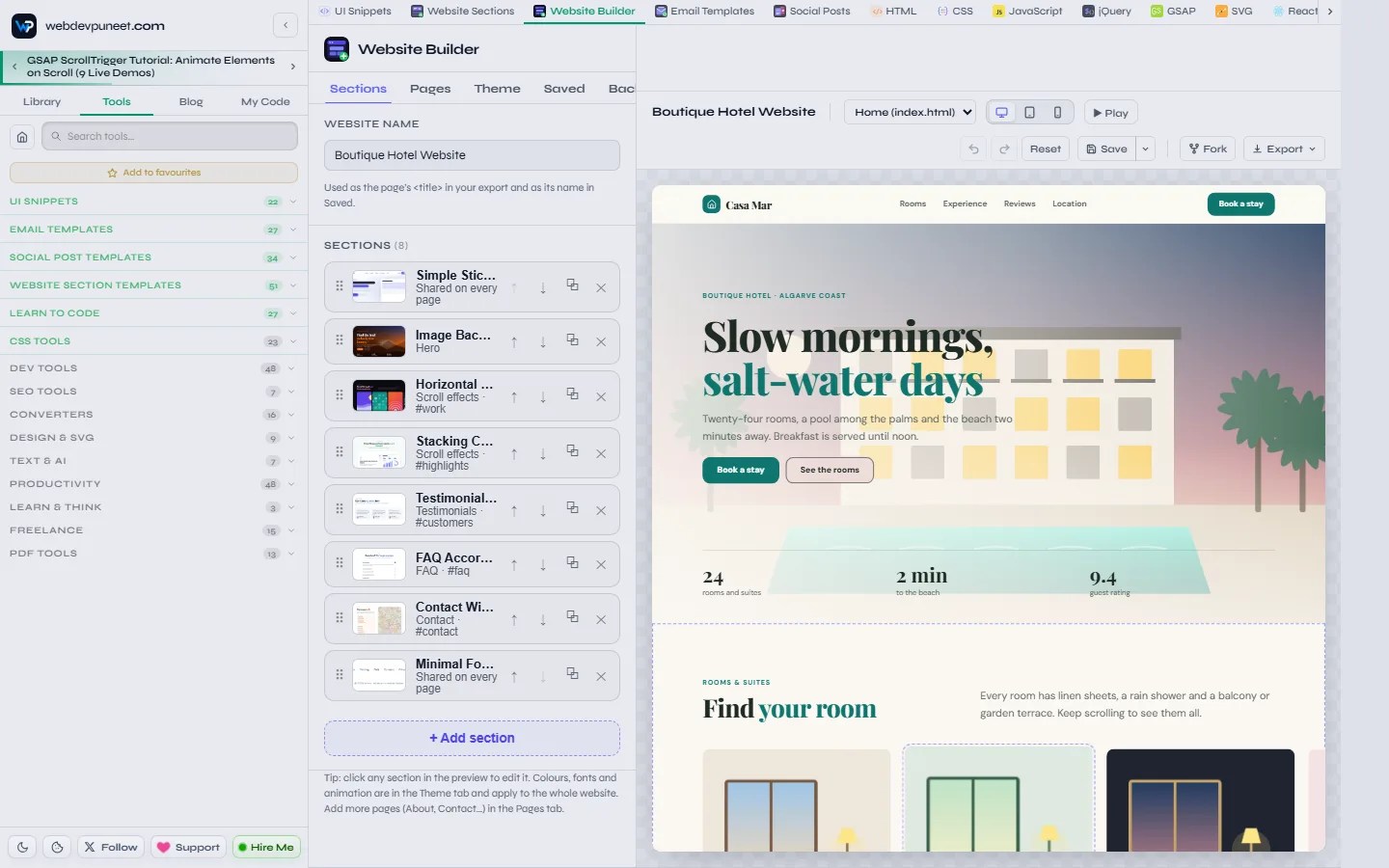
The short version
- What it is: a free, browser-based website builder and a library of editable website section templates. No account, no download, no code needed.
- Website templates: 23 complete websites for SaaS, apps, startups, agencies, portfolios, photographers, restaurants, real estate, gyms, dentists, local services, online courses, coaches, events, nonprofits, weddings, hotels, salons, law firms, podcasts, product stores, schools and churches. Each one opens as a one-page site or a multi-page website.
- Website sections: 51 sections in 14 categories, all sharing one theme, so any combination looks like one website.
- Animation: GSAP and ScrollTrigger built in: entrance animations, headline text effects, smooth scrolling, parallax, a reading progress bar, 11 scroll animation presets and four full scroll-effect sections.
- Editing: click any text in the preview to type over it, upload images, pick icons, change colours, fonts, spacing and sizes, and preview on desktop, tablet and mobile.
- SEO built in: page titles and meta descriptions, canonical links, sitemap.xml, robots.txt, llms.txt for AI assistants, a favicon and FAQ structured data.
- Export: a ZIP of plain HTML/CSS/JS, a Next.js project, a React component, a Vue component or a fork to My Code. Host it on Netlify, Vercel, GitHub Pages, Cloudflare Pages or any web host.
- Privacy: everything runs and is saved in your browser. Nothing is uploaded.
Quick start: your first website in five minutes
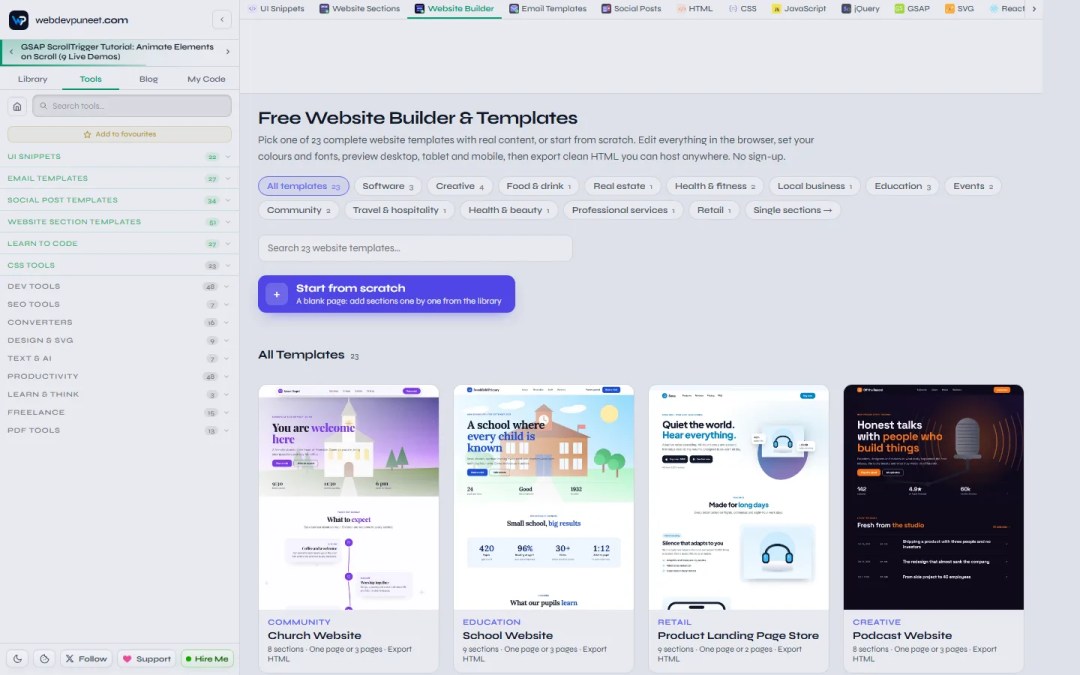
- Open the Website Builder and pick a template from the gallery (filter by industry or search), or click Start from scratch for a blank page.
- On the template’s page, choose Use as one page or Use as a multi-page website. The editor opens with every section already filled in with realistic content.
- Click any headline or paragraph in the preview and type. Click an image, icon or button to jump to its setting in the panel on the left.
- Open the Theme tab and choose a colour preset, your brand colour and your fonts. Every section updates at once.
- Add, remove, duplicate or drag sections into a new order in the Sections tab.
- Press ▶ Play to see the animations, and switch between desktop, tablet and mobile.
- Click Export → Download ZIP, unzip it and upload the folder to your host. Your website is live.
Two tools that work together: Website Builder and Website Sections
There are two editors, and they share the same sections, theme and code.
- Website Builder is for whole websites: you stack sections into pages, add more pages, set one theme for everything and export the complete site.
- Website Sections is for one section at a time: a hero for a landing page you already have, a pricing table for a WordPress or Webflow site, or a footer for a React app. You edit it and export just that section as HTML and CSS, a ZIP, React or Vue. When it’s ready, Add to page sends it straight into a website in the builder.
| You want to… | Use |
|---|---|
| Launch a complete website or landing page | Website Builder (start from a template) |
| Build a multi-page site with a shared menu and footer | Website Builder (multi-page) |
| Grab one section for an existing site or app | Website Sections |
| Get a section as a React or Vue component | Website Sections (or the builder’s React / Vue export) |
| Get a whole site as a Next.js project | Website Builder → Download Next.js site |
All 23 website templates
Every website template is a complete page with real, specific content (not lorem ipsum): a believable business, real headings, prices, reviews, FAQs and contact details you replace with your own. The gallery shows the newest templates first, and each template has its own page with a full-length preview, the list of sections and the number of pages.


Software and startups
- SaaS Landing Page: navbar, split hero with a dashboard mock-up, logo cloud, features, testimonials, three-tier pricing with a monthly/yearly switch, FAQ, CTA and footer. Multi-page version: 5 pages.
- Mobile App Landing Page: app hero with App Store and Google Play buttons, features next to a phone, how it works, a wall of moving reviews, a download CTA and FAQ.
- Startup Launch & Waitlist: announcement bar, gradient hero, bento-grid features and a newsletter / waitlist sign-up. A coming-soon page in minutes.
- Product Landing Page Store: one product sold well. Product hero with price and rating, features in detail, numbers, reviews, a buy box with a guarantee, FAQ and a final CTA. Ideal for Shopify, Gumroad or Kickstarter product pages.
Creative and personal
- Creative Agency Website: floating navbar, dark hero, bento services, results, a team carousel, a case study, a journal and a big wordmark footer.
- Personal Portfolio Website: portfolio hero, services, client reviews, a journal and a working contact form. For designers, developers and freelancers.
- Photographer Website: full-bleed photo hero, services and packages, client love, a journal and a booking form.
- Podcast Website: a dark studio hero with listen links, the latest episodes with show notes, where to listen, the hosts, listener reviews and a newsletter.
Local businesses and services
- Restaurant Website: photo hero with a booking button, menu highlights, set menus, reviews, opening hours with a map. Multi-page: 4 pages.
- Real Estate Agency Website: house hero, featured property listings, services, how buying works, results, the agent team, reviews, FAQ and contact.
- Gym & Fitness Website: bold hero, classes, a weekly class timetable, memberships with a yearly switch, coaches, member reviews, FAQ and a sign-up CTA.
- Dental Clinic Website: calm hero, treatments, online booking, how a visit works, dentists, reviews, FAQ and location.
- Local Service Business Website: a trust-first hero for plumbers, cleaners, electricians and other trades, with services, results, reviews, a service-area FAQ and a quote form.
- Hair & Beauty Salon Website: salon hero, a menu-style price list, stylists, reviews, online booking and a map.
- Law Firm Website: dark, trustworthy hero, practice areas as stacking cards, how a case works on a drawn timeline, partners, reviews, FAQ and a consultation form.
- Boutique Hotel Website: dusk hero, rooms in a horizontal scroll gallery, the experience as stacking cards, guest reviews, FAQ and location.
Education, events and community
- Online Course Website: course hero, what you’ll learn, the curriculum, the instructor, student results, one-price pricing and FAQ.
- Coach & Consultant Website: personal hero, how you help, programmes, client results, a spotlight story, a newsletter and booking.
- School Website: welcoming hero, key numbers, what pupils learn, a weekly timetable, staff, a parent FAQ and how to visit.
- Event & Conference Website: stage hero with dates, why attend, speakers, the schedule, ticket tiers, sponsors and FAQ.
- Wedding Website: floral hero with the date, your story told as a pinned scroll story, a day schedule that draws itself, travel tips and an RSVP form.
- Nonprofit & Charity Website: mission hero, impact numbers, how donations help, programmes, stories, the team, a newsletter and a donate CTA.
- Church Website: chapel hero with service times, what to expect on your first Sunday as a drawn timeline, groups, leaders, events and how to find us.
See real exported websites
These are complete templates downloaded straight from the builder, with no changes. Scroll inside each preview, or open it full screen to see it the way a visitor would.
Boutique Hotel: a horizontal scroll gallery of rooms and stacking cards for the experience.
Open the hotel website full screen ↗
Wedding: your story as a pinned scroll story, and a wedding-day schedule whose line draws itself as you scroll.
Open the wedding website full screen ↗
SaaS landing page: the classic software layout, with a pricing table you can switch between monthly and yearly.
Open the SaaS landing page full screen ↗
More full exports to open in a new tab: Restaurant website, Law firm website (stacking cards and a drawn timeline) and Podcast website.
One-page website or multi-page website
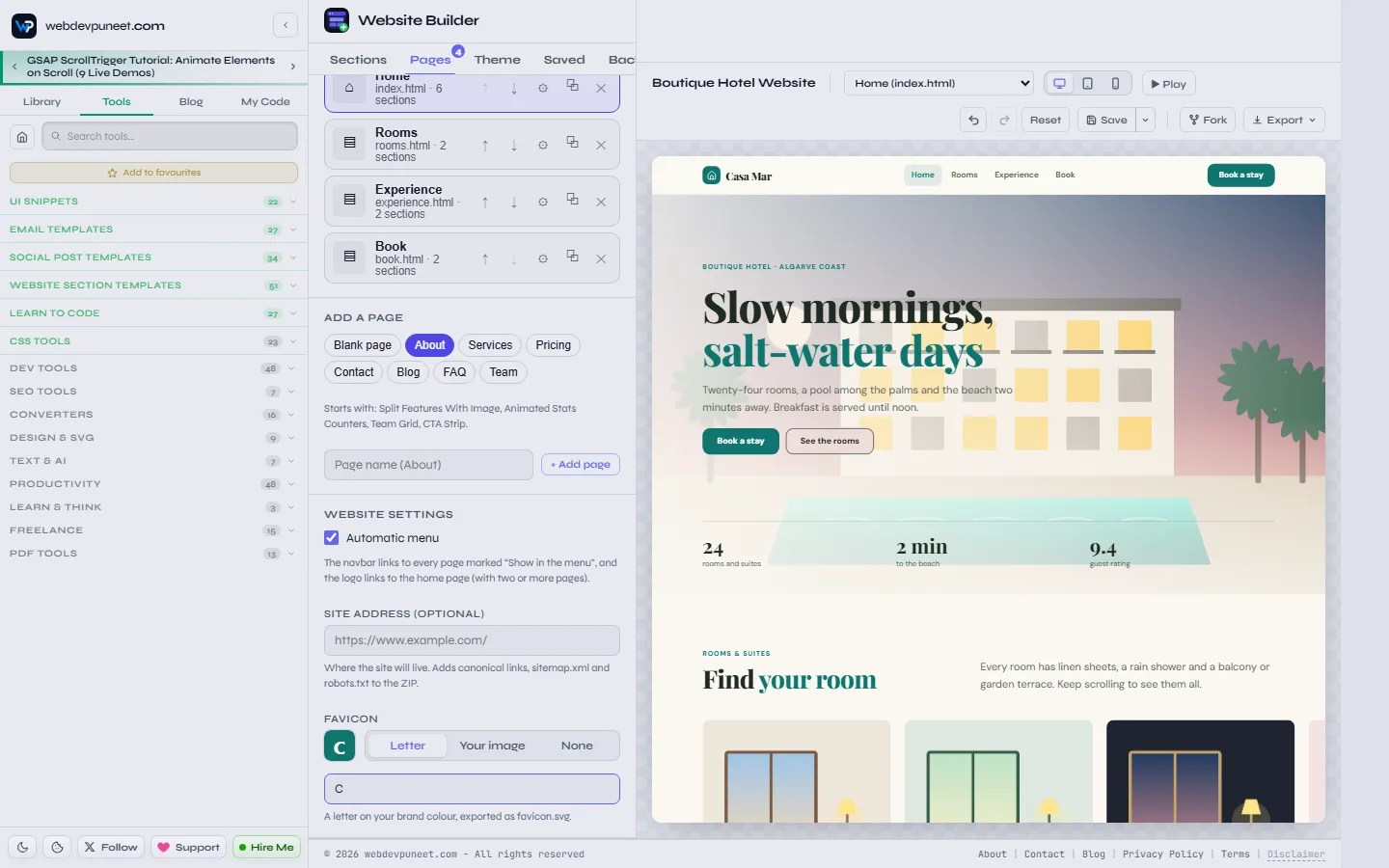
Every template opens either way. One page keeps everything on a single scrolling page, with menu links that jump to each section, which is perfect for landing pages, launches and small businesses. The multi-page website splits the same content into proper pages (for example Home, Rooms, Experience and Book for the hotel) that share one navbar, one footer and one theme.
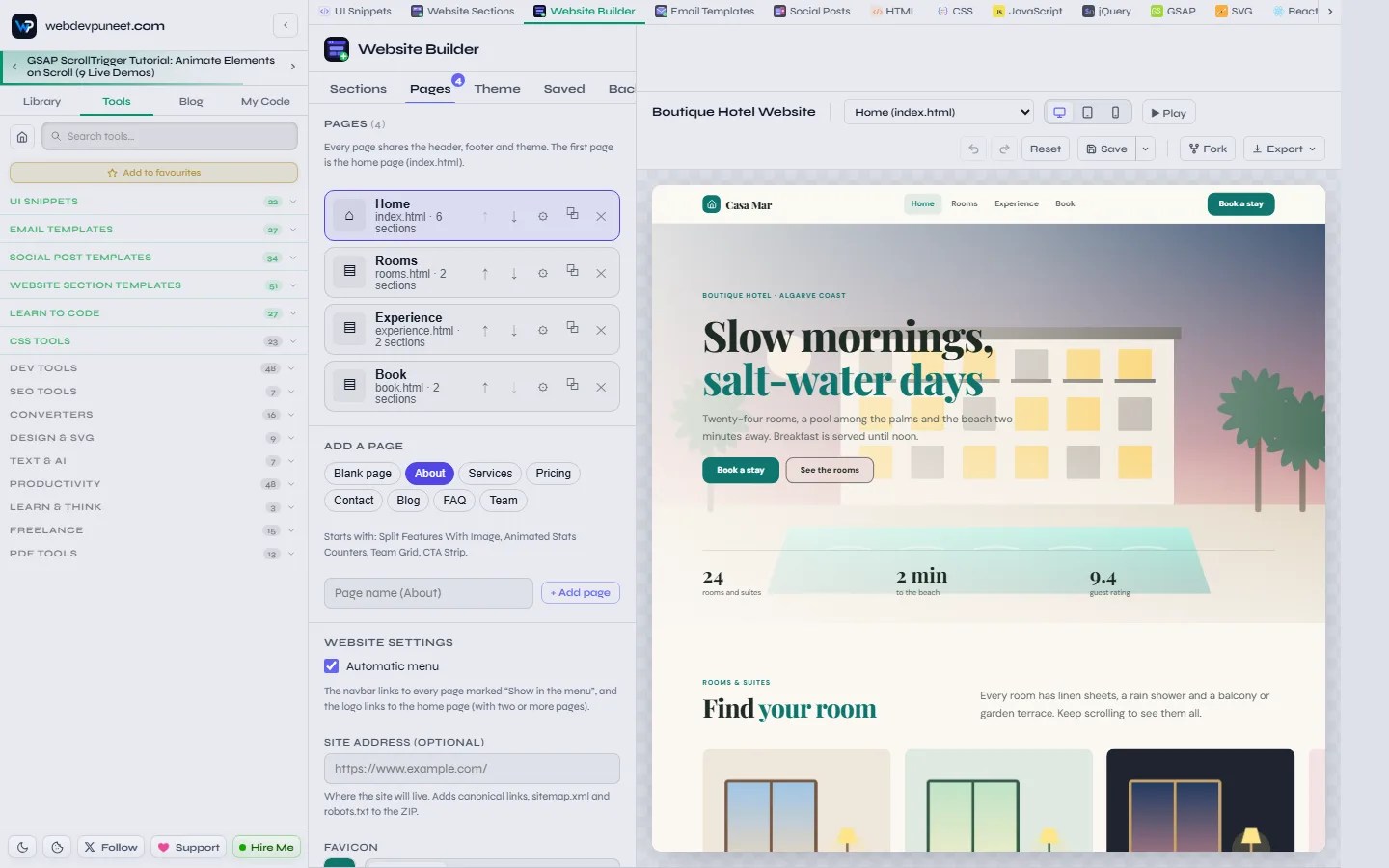
- Add a page from a ready-made layout: Blank, About, Services, Pricing, Contact, Blog, FAQ or Team. Each one arrives with the sections that kind of page needs.
- Automatic menu: the navbar links to every page marked “Show in the menu”, the logo links home, and the link for the current page is highlighted, so visitors always know where they are.
- Per-page SEO: each page gets its own file name, title and meta description, and can hide the shared header or footer (useful for a focused landing or thank-you page).
- Switch pages in the toolbar while you edit, or click a menu link inside the preview to open that page.
Here’s a multi-page website exactly as the ZIP export writes it: three pages, a shared stylesheet and script, a favicon, a sitemap and llms.txt. Click the menu: the links work, and each page highlights its own link.
Open the multi-page site ↗ · Download the exported ZIP (HTML pages, styles.css, script.js, images, favicon, sitemap.xml, robots.txt, llms.txt)
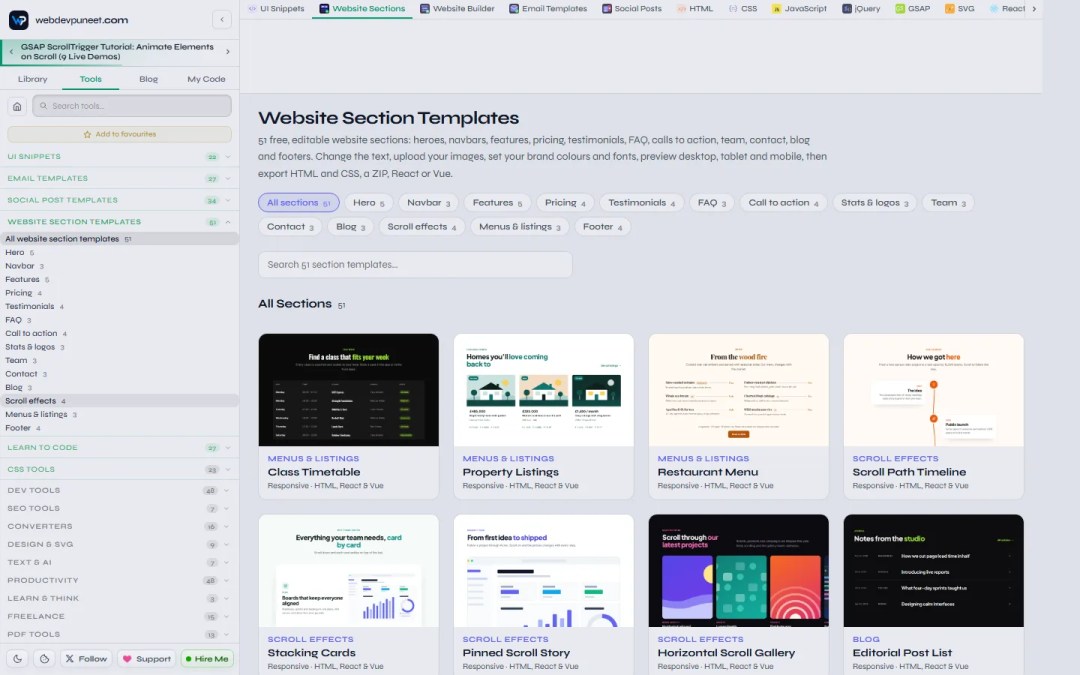
51 website section templates in 14 categories
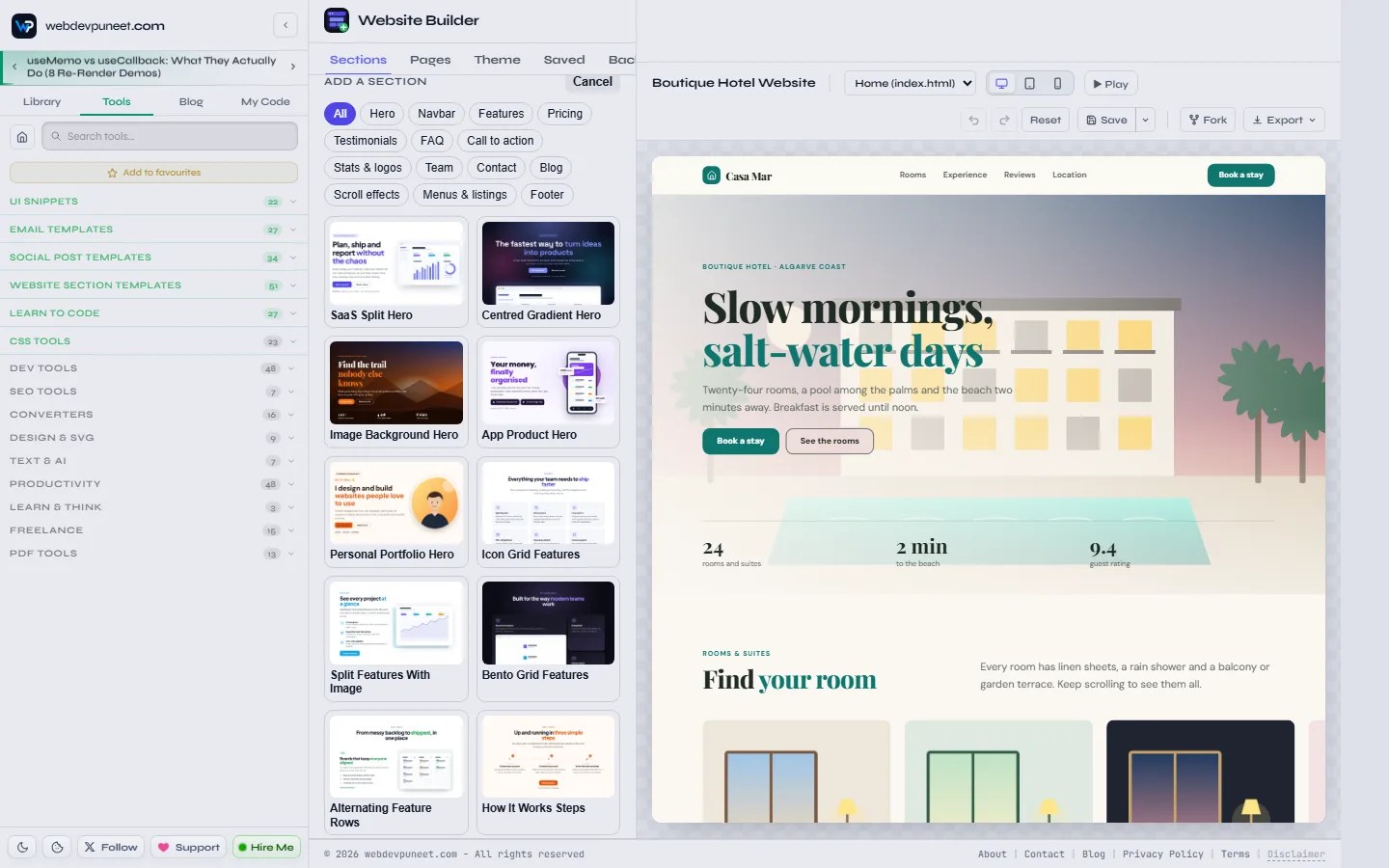
Sections are the building blocks. Each one is a complete, responsive page block with its own fields, images, toggles and repeatable items (add, duplicate, reorder or remove cards, plans, questions or team members). Because every section reads the same theme (colours, fonts, corner radius, content width and sizes), you can mix a hero from one template with pricing from another and it still looks like one website. Sections use CSS container queries, so they adapt to the space they’re given, not just the screen size.
| Category | Sections |
|---|---|
| Hero (5) | SaaS Split Hero, Centred Gradient Hero, Image Background Hero, App Product Hero, Personal Portfolio Hero |
| Navbar (3) | Simple Sticky Navbar, Floating Pill Navbar, Navbar With Announcement Bar (all with an accessible mobile menu) |
| Features (5) | Icon Grid, Split Features With Image, Bento Grid, Alternating Feature Rows, How It Works Steps |
| Pricing (4) | Three-Tier, Dark Glow, Single Plan, Pricing List Rows (all with a monthly/yearly switch) |
| Testimonials (4) | Testimonial Wall, Testimonial Carousel, Testimonial Marquee, Testimonial Spotlight |
| FAQ (3) | FAQ Accordion, Split FAQ With Contact Card, FAQ Grid |
| Call to action (4) | Gradient CTA Banner, Split CTA With Image, Newsletter Signup CTA, CTA Strip |
| Stats & logos (3) | Animated Stats Counters, Scrolling Logo Cloud, Stats With Logos (Dark) |
| Team (3) | Team Grid, Team Carousel, Team With Hiring CTA |
| Contact (3) | Contact Form With Details, Contact Options Cards, Contact With Map |
| Blog (3) | Blog Post Cards, Featured Post With List, Editorial Post List |
| Scroll effects (4) | Horizontal Scroll Gallery, Pinned Scroll Story, Stacking Cards, Scroll Path Timeline |
| Menus & listings (3) | Restaurant Menu, Property Listings, Class Timetable |
| Footer (4) | Multi-Column Footer, Big Wordmark Footer, Footer With Newsletter, Minimal Footer |
GSAP scroll animation sections, with live demos
The Scroll effects category is where the builder goes beyond static blocks. These four sections use GSAP ScrollTrigger to pin a section and drive the motion with the scroll bar, the kind of effect you see on award-winning product sites. You get them without writing any JavaScript, and they’re built carefully:
- Layout first: without JavaScript, with “reduced motion” turned on, or on small phones, each one shows a plain, complete layout. Nobody gets a broken page.
- Live in the editor: the builder’s preview scrolls like a real page, so you see the effect while you edit.
- Sticky-header aware: pinned sections sit below a sticky navbar instead of hiding under it.
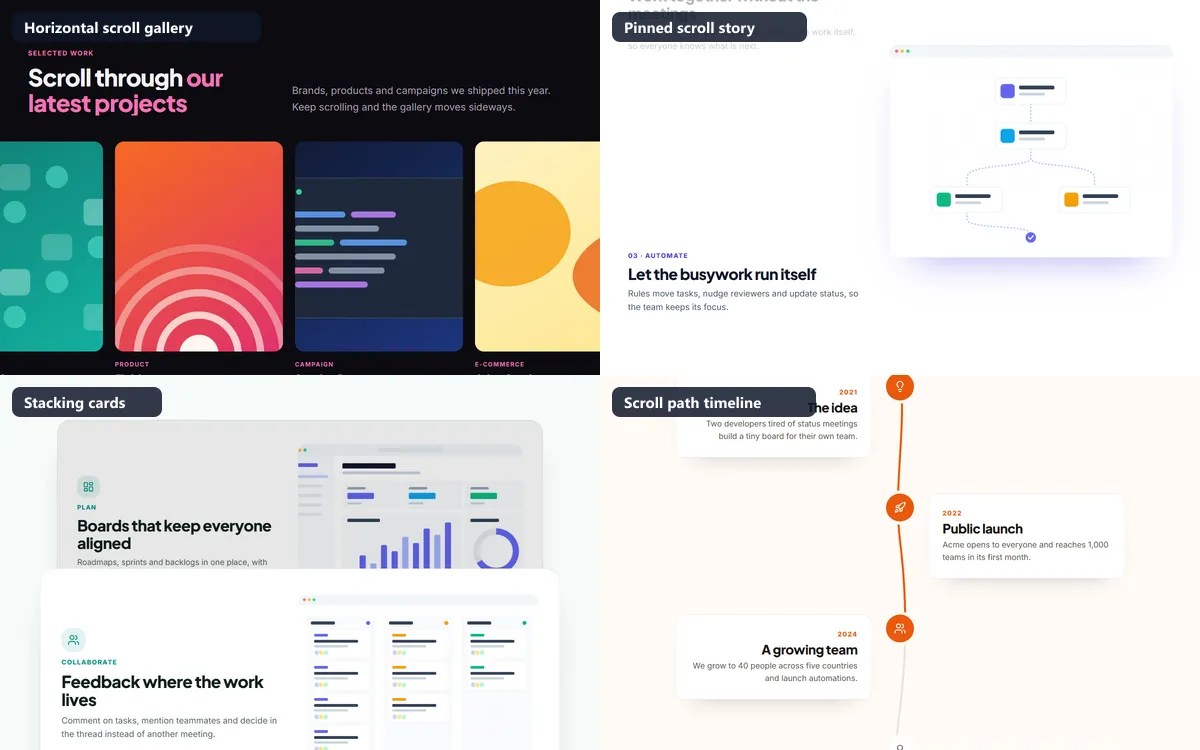
Each demo below starts with an empty screen on purpose: scroll down inside the preview and the section animates as it comes into view, exactly as it would on your site.
Horizontal Scroll Gallery
The section pins to the top of the screen and the row of cards slides sideways as you scroll down, for exactly as long as the row is wide. Then the page continues. Vertical scrolling, horizontal motion: great for portfolios, case studies, product ranges and hotel rooms.
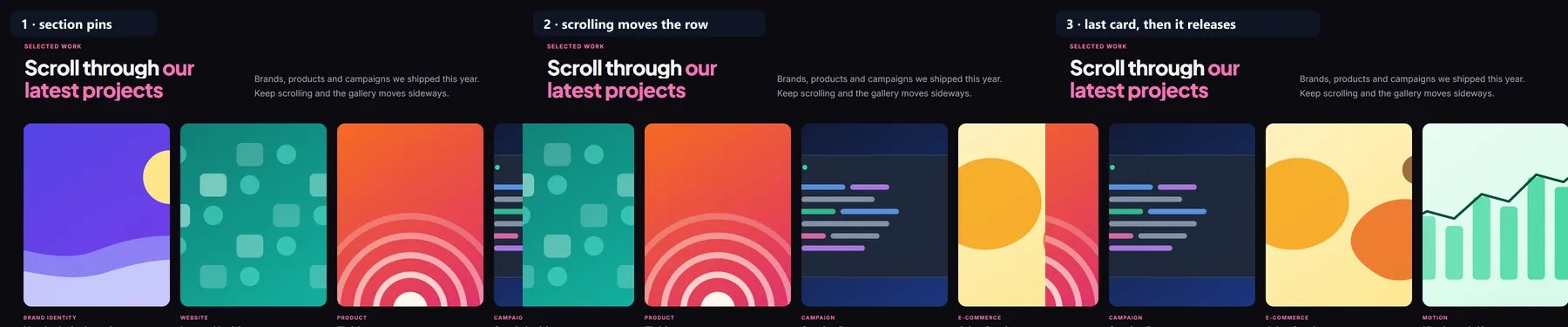
Under the hood it’s one tween (simplified):
gsap.to(row, {
  x: () => -(row.scrollWidth - row.clientWidth),
  ease: 'none',
  scrollTrigger: {
    trigger: section,
    start: 'top top',
    end: () => '+=' + (row.scrollWidth - row.clientWidth),
    pin: true,
    scrub: 0.6,
    invalidateOnRefresh: true
  }
});
Pinned Scroll Story
Steps scroll past on one side while a single image stage stays pinned on the other, cross-fading to the picture for the step in the middle of the screen. It’s the “sticky scrollytelling” layout used for product walk-throughs, onboarding stories and “how we work” pages. On phones each step simply shows its own image.
Stacking Cards
Each card pins a little below the one before it, so later cards slide over earlier ones, which shrink and dim as they’re covered. It turns a plain list of features, services or practice areas into something people actually scroll through.
Scroll Path Timeline
An SVG line draws itself down the page as you scroll, and each milestone lights up when the line reaches it. Use it for company history, a wedding-day schedule, a project process or “how a case works”. No plugin needed: it animates the stroke of the path.
Interactive sections: pricing switch, counters, marquee, accordion and more
Plenty of sections do something when you interact with them. These behaviours are small scripts that ship with the section in every export (HTML, ZIP, React, Vue, Next.js), and they keep working even if you switch the page’s entrance animation off.
Hero with a headline text effect
Headlines can animate word by word (“Words rise”), line by line (“Line reveal”), letter by letter (“Letters”) or come into focus (“Blur in”), powered by GSAP SplitText. The text is split only after the fonts load, so lines break where they finally will, and screen readers still read the whole headline.
Pricing table with a monthly/yearly switch
All four pricing sections include a billing switch: the pill slides, the prices roll to the yearly amounts and a “Save 20%” badge appears. The labels, prices and suffixes are all fields you edit, and the switch can be turned off.
Animated stats counters
Numbers count up from zero when the section scrolls into view, keeping their prefix, suffix, thousands commas and decimals (“$2.4M”, “98%”, “1,200+”).
Bento grid features
The fashionable bento layout: cards of different sizes in one tidy grid, fading up one after another with the page’s entrance animation.
Testimonial marquee
Two rows of reviews drift in opposite directions forever. Hovering or focusing a row slows it to a stop, so people can actually read a quote.
FAQ accordion (with FAQ schema for Google)
Questions open and close smoothly, and the exported page includes FAQPage structured data (JSON-LD) built from your questions and answers, so search engines and AI assistants can read them directly.
Gradient CTA banner with a spotlight and a magnetic button
A soft glow follows the pointer across the banner, and the button leans toward the cursor as it gets close. Small touches that make a call to action feel alive.
Menus and listings: restaurant menu, property listings, class timetable
Industry sections that generic builders usually skip. The Restaurant Menu has a printed-menu look with dotted leaders to the price and tags like “V” or “Chef’s pick”. Property Listings shows homes with price, status, beds, baths and area. The Class Timetable is an accessible schedule table that turns into labelled cards on phones, which suits gyms, studios, schools and event agendas.
Animations for the whole website
In the Theme tab, one animation setting covers every section on every page:
- Entrance effect: None, Fade up, Fade, Slide in or Zoom. Each section animates in as it scrolls into view, items one after another.
- Headline text effect: None, Words rise, Line reveal, Letters or Blur in.
- Speed: Fast, Normal or Slow.
- Page scroll effects: smooth scrolling (GSAP ScrollSmoother, on desktop with a mouse; touch keeps native scrolling), parallax and a reading progress bar.
Content is always visible without JavaScript (the hidden “from” state is only applied by GSAP), and every animation switches off for people who set “reduce motion” on their device. While you edit, the preview stays still so it doesn’t distract you. Press ▶ Play to turn the animations on: the preview starts from the top, stays animated while you keep editing, and replays each section every time you scroll back to it. Press ■ Stop to go back to the still view.
Scroll animations per section: presets, timeline and keyframes
Any section can replace its entrance animation with a scroll animation, set in the section’s panel under “Scroll animation”. Start from one of 11 presets:
Rise into view · Parallax image · Zoom image in · Pinned zoom · Headline wipe · Blur in · Pop in · Count up with scroll · Sticky image · Step-by-step story · Fade out on leave
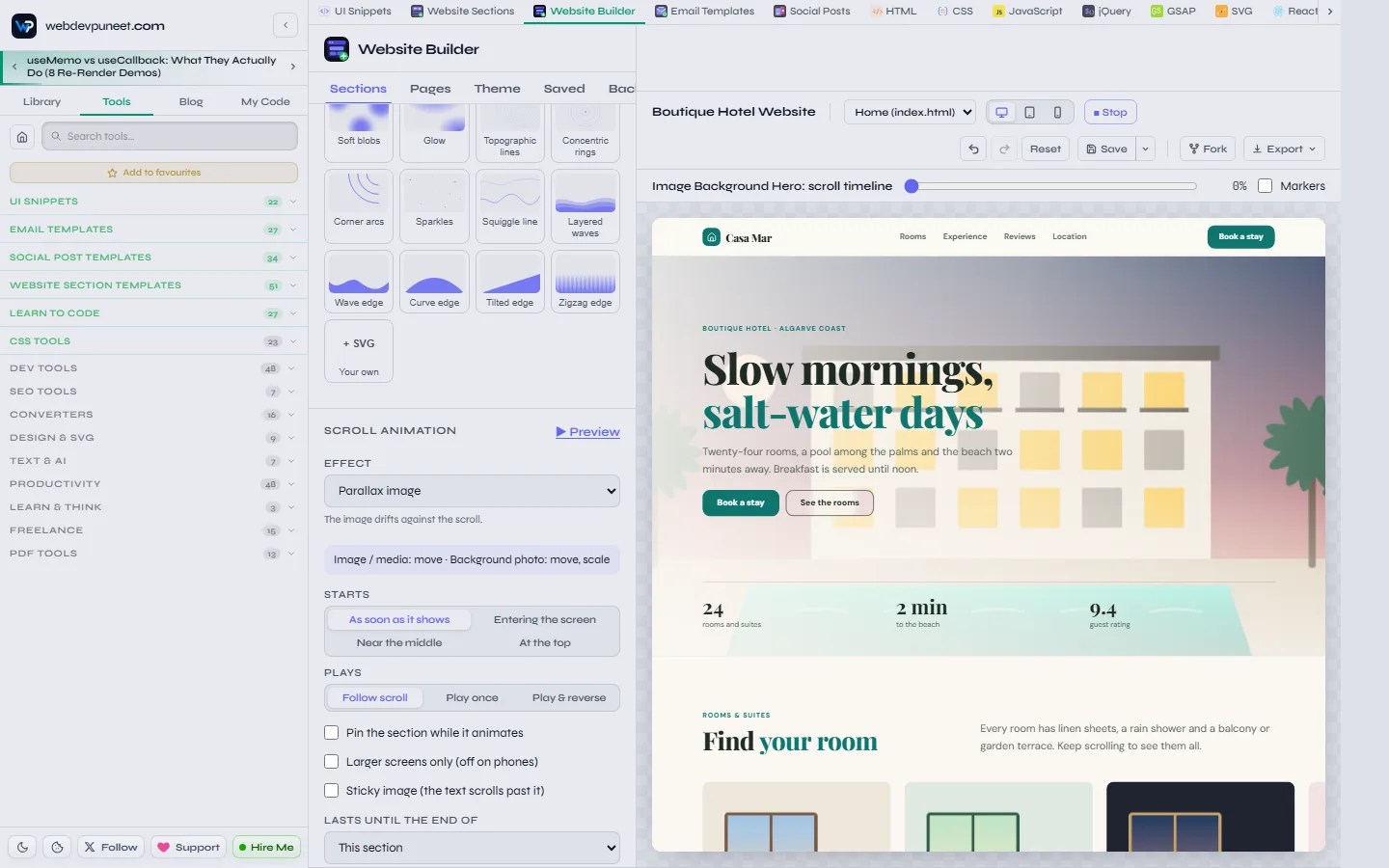
- Starts: as soon as it shows, entering the screen, near the middle or at the top.
- Plays: follow the scroll bar (scrub), play once, or play and reverse.
- Options: pin the section while it animates, larger screens only (off on phones), a sticky image while the text scrolls past, or make the animation last until the end of a later section.
- Keyframes: every preset is a set of tracks you can edit: move, scale, rotate, fade, blur or clip, each with its own keys, values, easing and stagger. Use Pick an element to click any part of the section in the preview and animate just that.
- Timeline scrubber: drag through the animation in the preview to check every moment, and switch on ScrollTrigger markers to see exactly where it starts and ends.
Editing your website
Click to edit, right in the preview
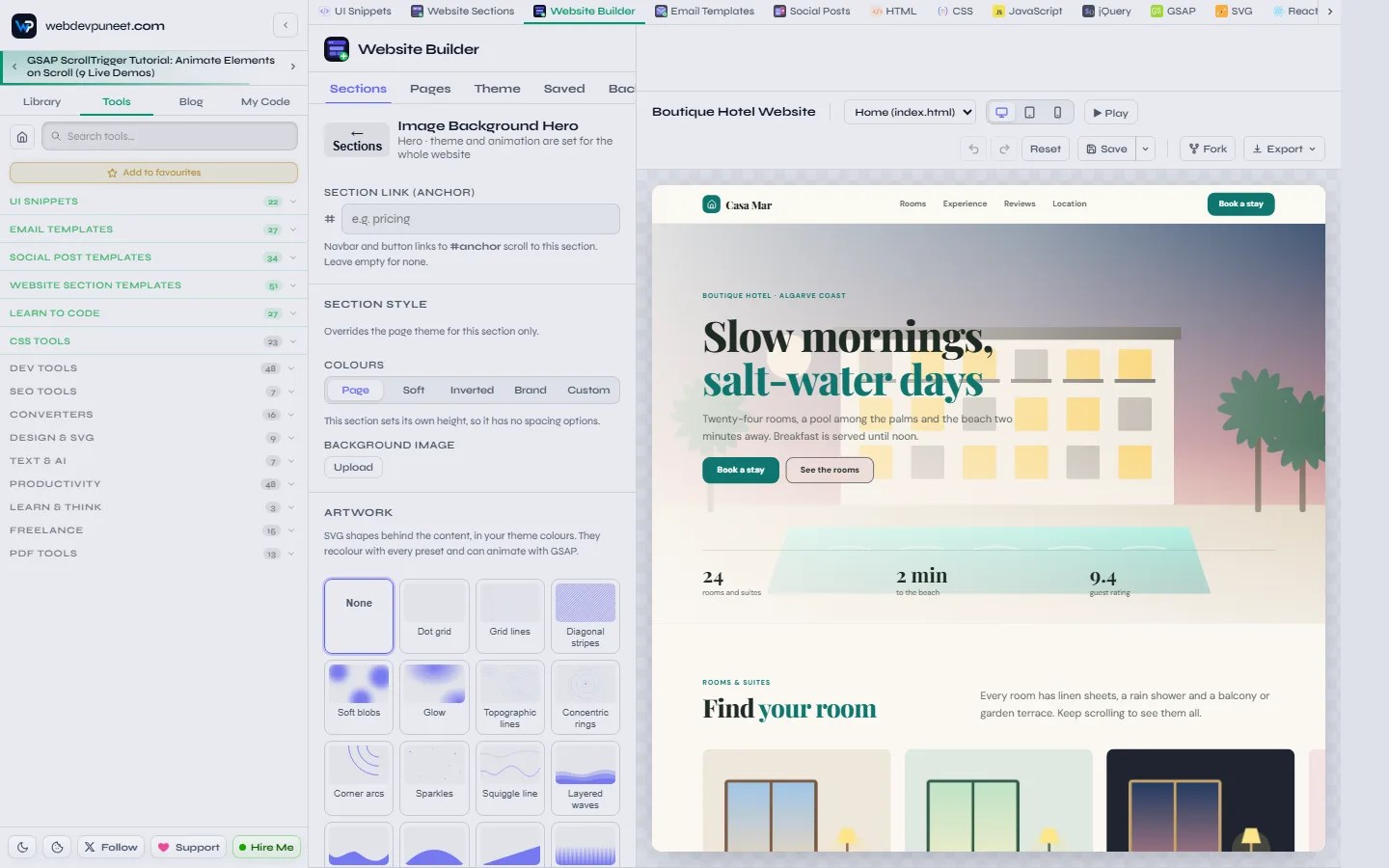
Click a headline, paragraph or button label in the preview and type. A small toolbar appears over selected text for bold, italic, underline and the brand-colour highlight (wrap words in *asterisks* in any field for the same effect). Click an image, icon, list or link and the matching field opens in the panel and flashes, so you never hunt for a setting.
Add, reorder and remove sections
Click + Add section to open the picker with all 51 sections and their previews, filter by category, and the section lands below the one you selected. Drag rows by their handle to reorder (the others slide out of the way), or use the ↑ ↓ buttons from the keyboard. Duplicate and remove are one click, and Undo / Redo (Ctrl+Z / Ctrl+Y) covers everything, including Reset.
Images, icons and repeatable items
- Images: paste a URL or upload a file. Uploads are resized in your browser to a sensible size and kept in an image library you can reuse across sections and designs.
- Icons: 60 built-in icons plus whole open-source icon sets to search, stored inside your design so exports work offline.
- Lists: features, pricing plans, testimonials, team members, FAQ questions, menu dishes and listings are repeatable: add, duplicate, reorder or remove items, each with its own fields and images.
- Section links: every section can have an anchor (#pricing, #faq…) so navbar and button links scroll to it.
Section style: make one section stand out
Any section can override the website theme for itself: a colour scheme (Page, Soft, Inverted, Brand or Custom colours), more or less space above and below, and a background image with a colour overlay so text stays readable. That’s how you get a dark testimonial band or a brand-coloured CTA without touching the rest of the site.
Theme: colours, fonts, shape and sizes
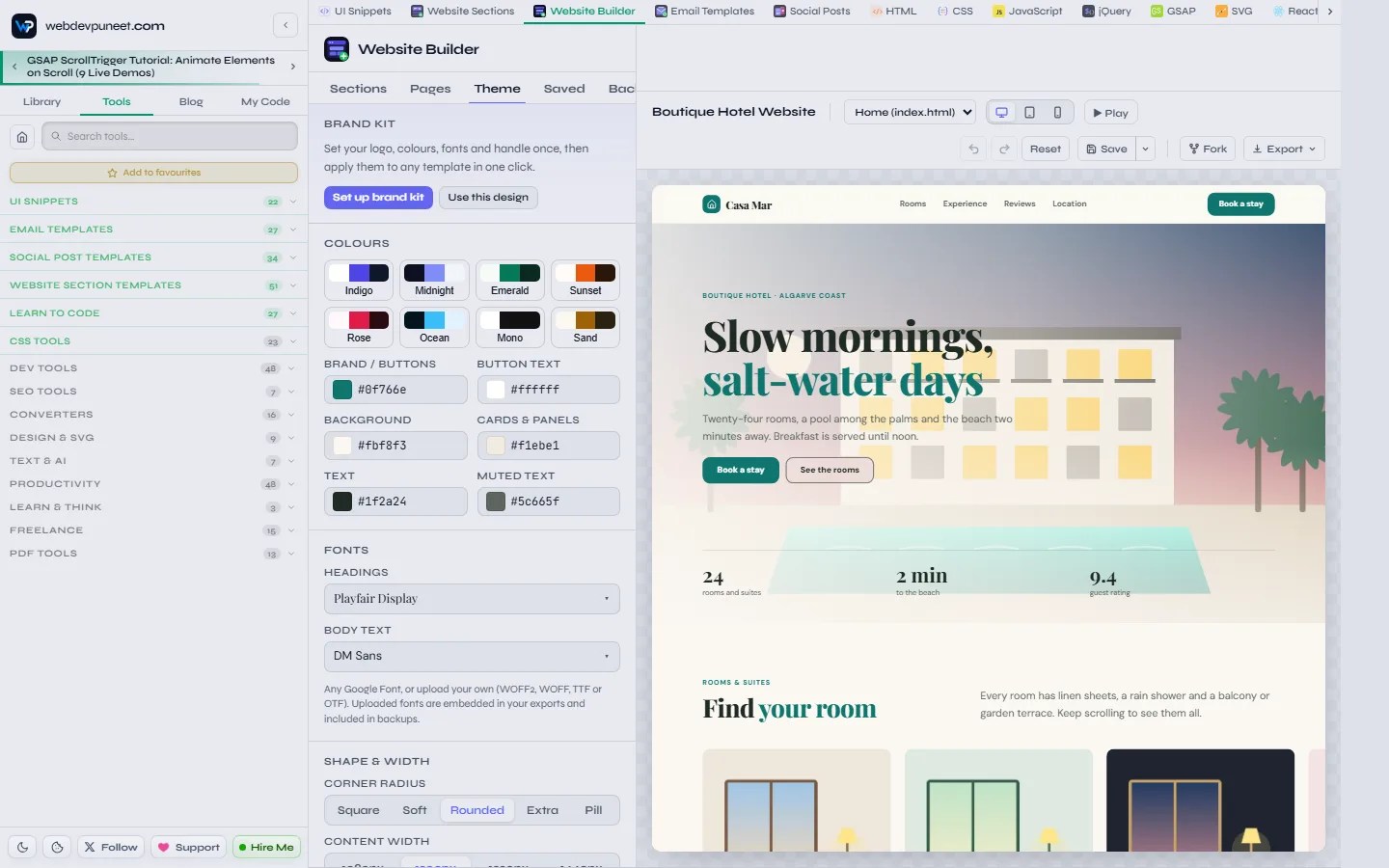
- 8 colour presets: Indigo, Midnight, Emerald, Sunset, Rose, Ocean, Mono and Sand, then fine-tune the brand, button text, background, cards, text and muted colours.
- Fonts: a heading font and a body font from Google Fonts, or upload your own (WOFF2, WOFF, TTF or OTF). Uploaded fonts are embedded in your exports.
- Shape and width: corner radius (Square, Soft, Rounded, Extra, Pill) and content width (1080 to 1440px).
- Sizes: scale text size, padding and margins, and gaps for every section at once, from 60% to 160%.
- Brand kit: set your logo, colours, fonts and handle once and apply them to any template in one click. The same brand kit works in the Email Templates and Social Post Templates tools.
SVG artwork, including your own
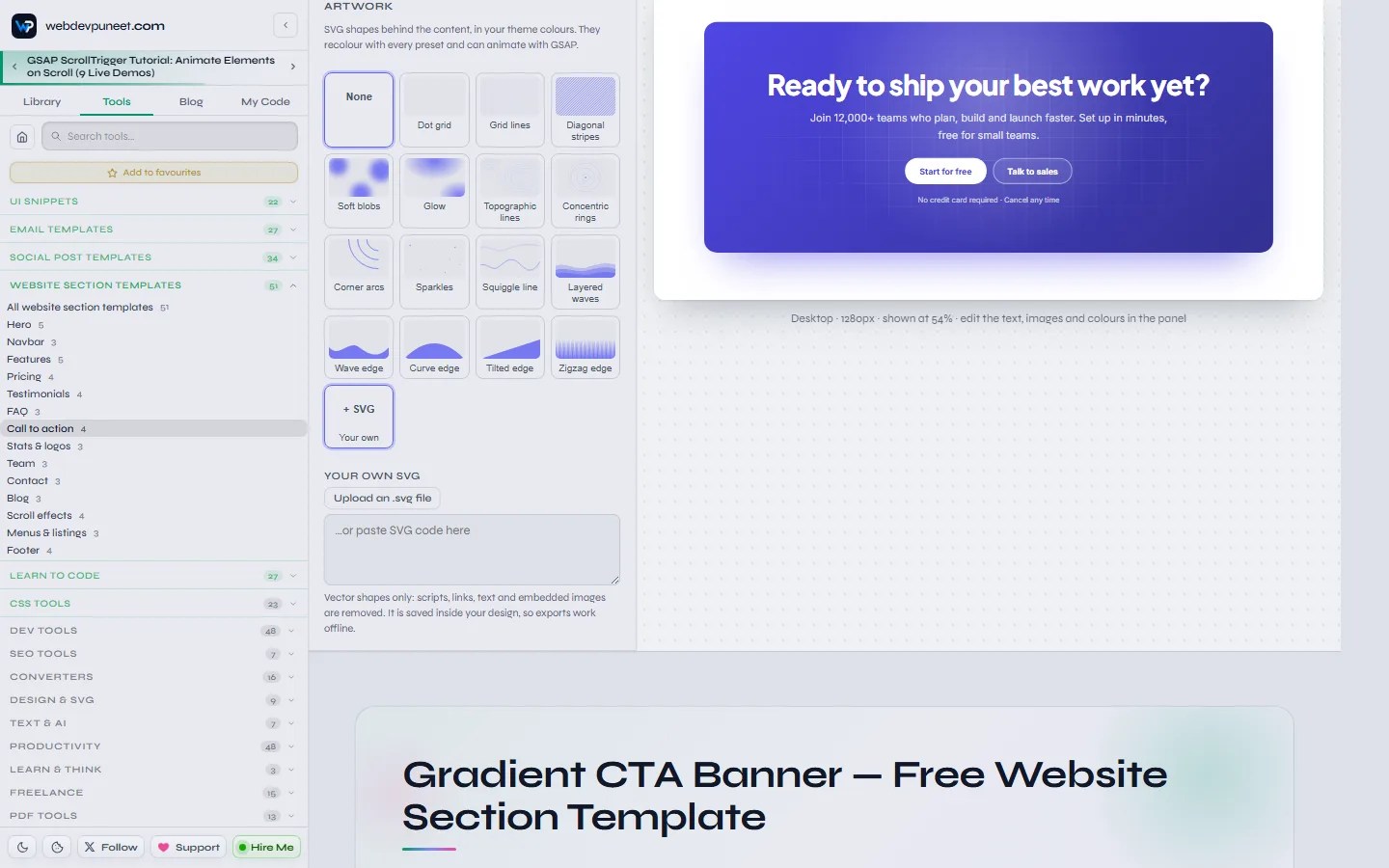
Add decorative SVG artwork behind any section: dot grids, grid lines, stripes, soft blobs, glows, topographic lines, rings, corner arcs, sparkles, squiggles and wave, curve, tilted and zigzag edges. Because it’s SVG in your theme colours, it recolours with every preset, stays tiny and sharp, and can float, spin, draw itself on scroll or move with parallax.
Choose Your own to upload or paste your own SVG. It’s cleaned down to plain vector shapes (scripts, links, text and embedded images are removed) and saved inside your design. Show it full-bleed or in a corner, in the theme colour or its own colours.
Preview on desktop, tablet and mobile
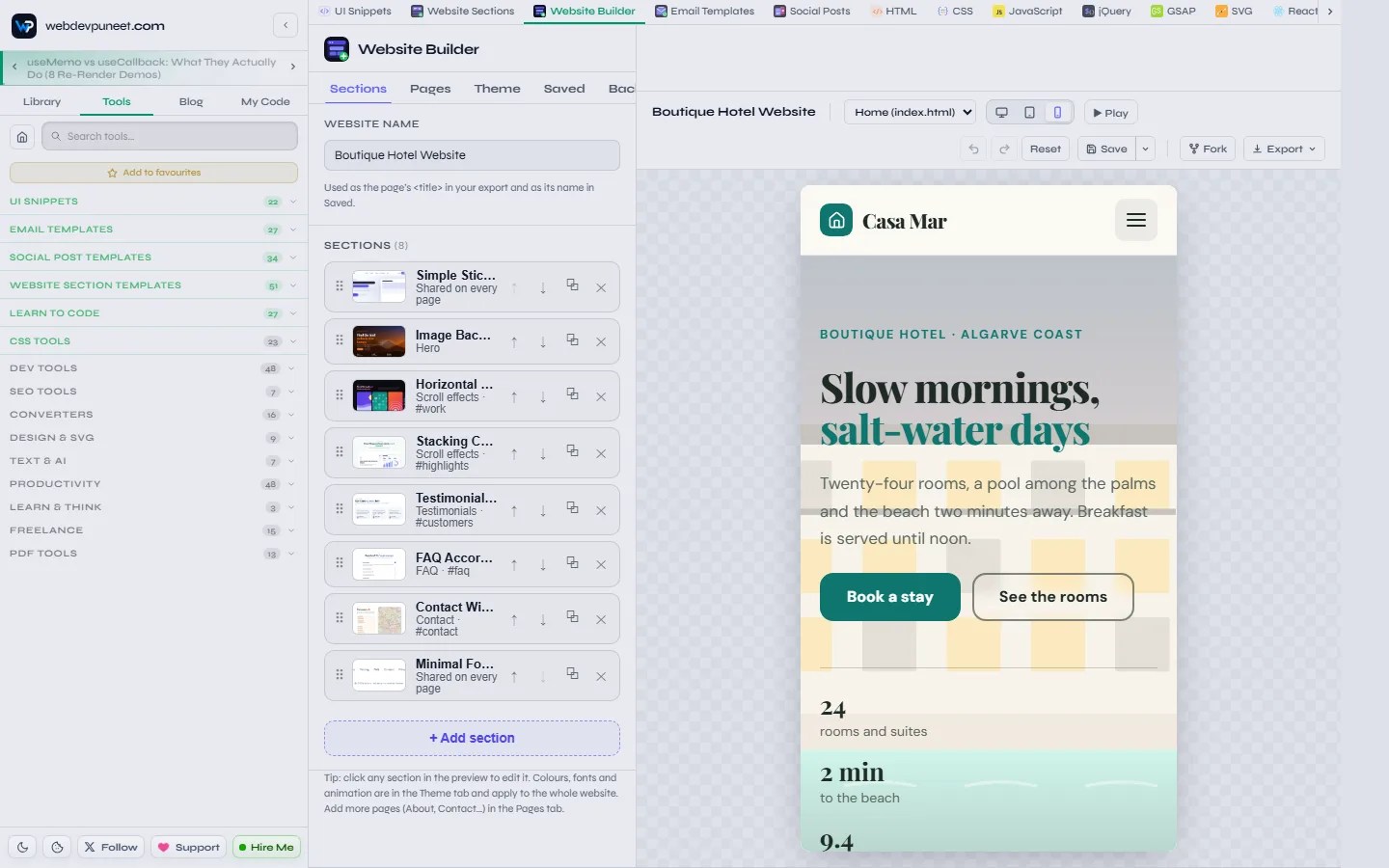
Switch the preview between desktop (1280px), tablet (820px) and mobile (390px). The page is rendered at the real width and scaled to fit, so what you see is what a phone will show, including the mobile menu.
SEO, AI search and site settings
A beautiful site that nobody finds isn’t much use. The builder handles the technical SEO for you:
- Titles and meta descriptions for every page.
- Site address: enter where the site will live and the export adds canonical links, sitemap.xml and robots.txt.
- llms.txt: every export includes an llms.txt file that lists your pages and their descriptions, so AI assistants such as ChatGPT, Claude, Gemini and Perplexity can understand your site.
- Structured data: FAQ sections add FAQPage schema and blog sections add a list of BlogPosting entries (JSON-LD), built from your own content.
- Favicon: a letter on your brand colour (exported as favicon.svg), your own image (a 180×180 favicon.png that also becomes the iPhone home-screen icon), or none.
- Clean, fast HTML: semantic markup, accessible menus and accordions, lazy-loaded images and GSAP loaded from a CDN only when the page uses it.
Every export option
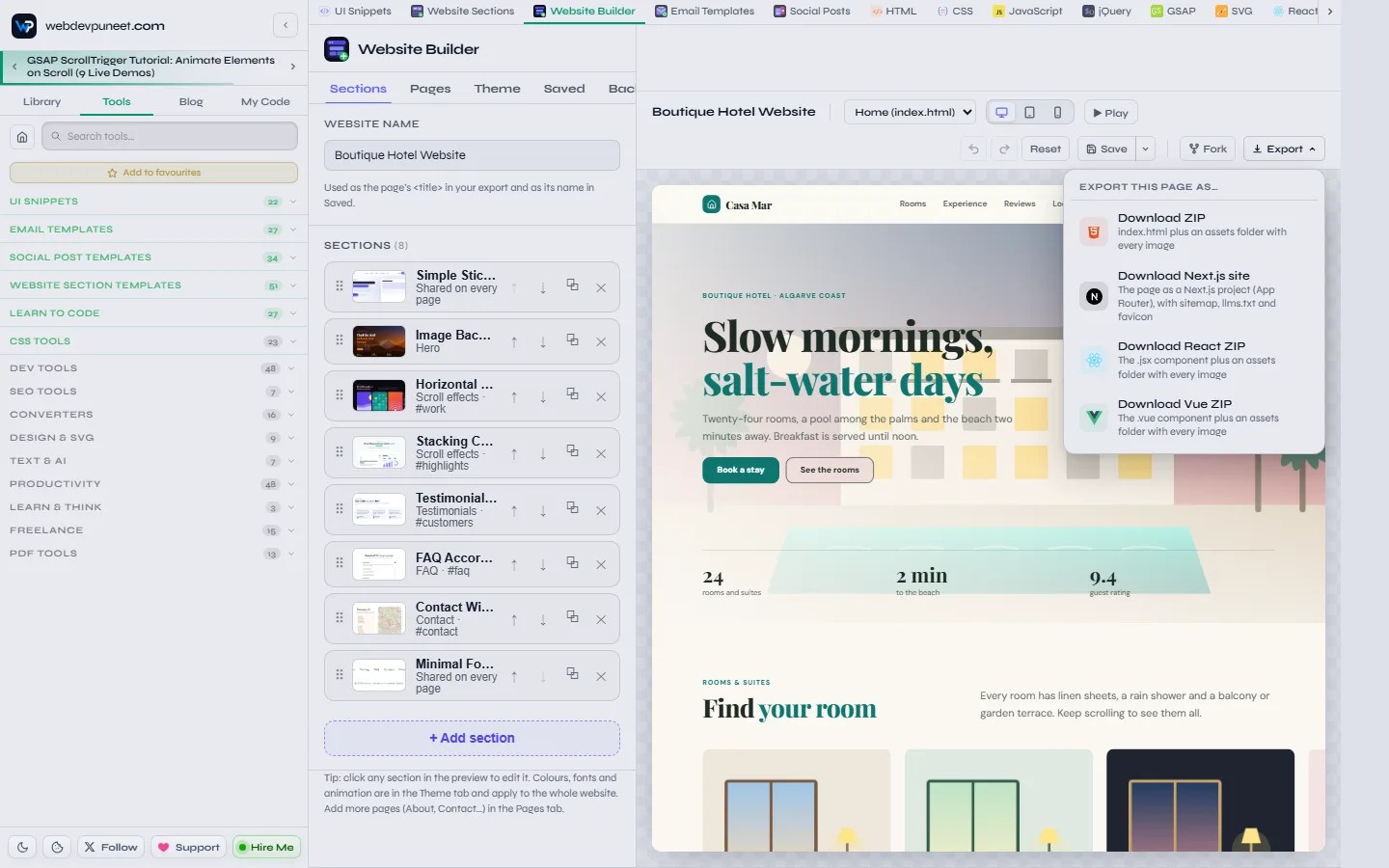
| Export | What you get | Best for |
|---|---|---|
| Download ZIP (one page) | index.html with the CSS inside, an assets folder with every image, llms.txt and a favicon | Landing pages on any host |
| Download website ZIP (multi-page) | One .html file per page, a shared styles.css and script.js, images, favicon, llms.txt, plus sitemap.xml and robots.txt when the site address is set | Static hosting: Netlify, GitHub Pages, Cloudflare Pages, cPanel |
| Download Next.js site | A Next.js App Router project: one route per page, metadata for each page, shared layout, CSS and script, set up for static export | Vercel, or growing the site in React |
| Download React ZIP | The page as a .jsx component with its CSS, plus an assets folder | Dropping a page into an existing React app |
| Download Vue ZIP | The page as a .vue single-file component, plus an assets folder | Vue and Nuxt projects |
| Fork | The whole page as one editable snippet in My Code, with GSAP included | Hand-editing the code in the browser |
Every colour, font and size in the exported CSS is a CSS variable at the top of the stylesheet (--st-brand, --st-font-heading…), so a developer can re-theme the site in seconds. The README in each ZIP explains every file.
How to put your website online
- Netlify: drag the unzipped folder onto app.netlify.com/drop. Your site is live on a free address in seconds; connect your own domain later.
- GitHub Pages: push the files to a repository and turn on Pages in the repository settings.
- Cloudflare Pages or Vercel: upload the folder (or the Next.js project) and deploy.
- Any web host (cPanel, FTP): upload the files into public_html. Multi-page links work from disk too, so you can open index.html locally first to check.
Saving your work and backups
- Autosave: the website you’re editing is saved continuously in your browser. Close the tab and it’s there when you come back (“Continue editing” on the Website Builder page).
- Save and Save as: keep as many websites as you like in the Saved tab (Ctrl+S saves). They also appear under “Your pages” on the Website Builder page, where you can open or delete them.
- Backup: export your websites, uploaded images and fonts to a single backup file, and import it on another browser or computer. Importing never overwrites what’s already there.
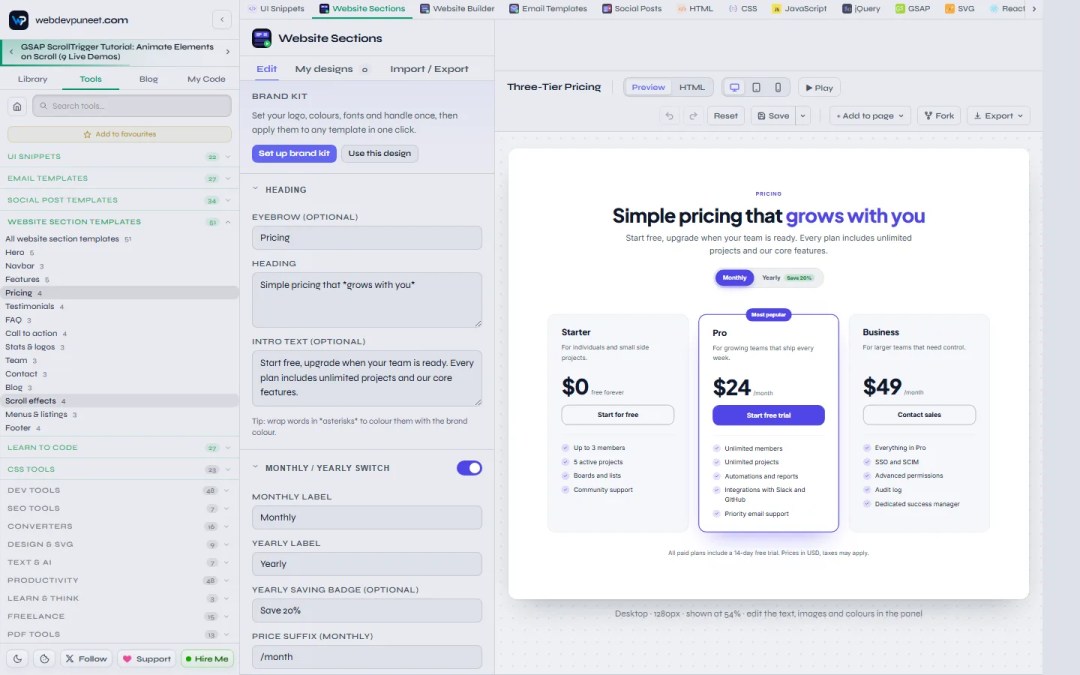
The Website Sections editor: one section at a time
Open any section from the section library and you get the same editing tools for just that block: fields, images, lists, theme, fonts, sizes, artwork and animation, with desktop, tablet and mobile previews and an HTML view of the code. Scroll-effect sections preview in a scrollable frame so you can watch the effect. Export the section as HTML and CSS, a ZIP, a React component or a Vue component, save it to My designs, or send it to a website with Add to page.
Who it’s for
- Small businesses that need a professional website this week without monthly builder fees.
- Founders and indie makers launching a SaaS, app or product landing page, or collecting a waitlist.
- Freelancers and agencies who want a fast starting point for client sites and full ownership of the code.
- Developers who want production-ready sections, GSAP scroll animations and a Next.js or React starting point without designing from scratch.
- Students and beginners learning how real websites are built: fork any page into My Code and read the HTML, CSS and GSAP.
- Schools, churches, charities and clubs that need a clear, accessible site on a zero budget.
Privacy: nothing leaves your browser
The builder runs entirely in your browser. Your websites, uploaded images and fonts are stored locally (in IndexedDB), never on a server, and there’s no account to create. That also means clearing your browser’s site data deletes them, so use the Backup tab to keep a copy.
For developers: how the sections are built
- Every section is plain HTML with scoped CSS. Theme values are CSS custom properties, so presets and the brand kit only change variables.
- Layouts respond with container queries, so a section behaves the same in a narrow column, the editor preview or a full-width page.
- Behaviours (menus, accordions, carousels, the billing switch, counters, marquees, scroll effects) are small, dependency-free scripts; GSAP and only the plugins a page needs (ScrollTrigger, SplitText, Flip, ScrollSmoother) are loaded from cdnjs.
- Everything is progressive: content is in the HTML, readable without JavaScript, and animations respect
prefers-reduced-motion.
Tips for a website that converts
- Say what you do in the first line. Visitors decide in seconds; the hero headline should name the outcome, not your company.
- One main action per page. Repeat the same button (“Book a stay”, “Start free trial”) in the hero, after the proof and at the end.
- Show proof early. A logo cloud, numbers or reviews right after the hero do more than another paragraph of features.
- Use motion to guide, not to decorate. One scroll effect section per page is memorable; five are tiring.
- Answer objections in an FAQ. It helps visitors and earns rich results in search and answers in AI assistants.
- Check the phone view before you publish: most visitors will see that first.
Frequently asked questions
Is this website builder really free?
Yes. The Website Builder, all 23 website templates and all 51 website sections are free, with no account, no watermark and no paid plan. The templates are free for personal and commercial use.
Can I export the website as HTML and host it anywhere?
Yes. Download ZIP gives you plain HTML, CSS and JavaScript files plus your images. Upload them to Netlify, Vercel, GitHub Pages, Cloudflare Pages or any web host. There’s no lock-in: the code is yours.
Can I export to React, Vue or Next.js?
Yes. The Export menu has a React ZIP (a .jsx component), a Vue ZIP (a .vue single-file component) and Download Next.js site, which gives you a complete Next.js App Router project with one route per page.
How do I add GSAP scroll animations without coding?
Add a section from the Scroll effects category (horizontal scroll gallery, pinned scroll story, stacking cards or scroll path timeline), or open any section’s panel and pick a scroll animation preset such as Parallax image or Pinned zoom. The builder writes the GSAP and ScrollTrigger code for you and includes it in your export.
Are the website templates responsive and mobile-friendly?
Yes. Every section adapts with container queries, navbars switch to an accessible mobile menu, tables become cards on phones, and you can preview desktop, tablet and mobile while you edit.
Can I build a multi-page website?
Yes. Open any template as a multi-page website or add pages yourself (About, Services, Pricing, Contact, Blog, FAQ, Team). Pages share one navbar, footer and theme, the menu updates automatically and highlights the current page, and the export writes one HTML file per page.
Is the exported website good for SEO?
Yes. Each page has its own title and meta description, the export adds canonical links, sitemap.xml and robots.txt once you set your site address, FAQ sections include FAQPage structured data, and llms.txt helps AI assistants read your site. The HTML is semantic and loads fast.
Do I need to know how to code?
No. You edit by clicking and typing in the preview and by choosing options in the panel. If you do code, you get clean, readable files to take further.
Where is my website saved?
In your browser only, with autosave while you work and the Saved tab for named versions. Use the Backup tab to download a backup file and import it anywhere else.
Can I use just one section on my existing site?
Yes. Open the section in Website Sections, edit it, and export only that section as HTML and CSS, a ZIP, React or Vue. It works in WordPress, Webflow embeds, Shopify themes or any framework.
Start building your website
Pick a template that’s close to what you need, change the words, colours and photos, add a scroll effect if it suits your story, and export. Most people have a real, live website within an hour.
- Open the free Website Builder and choose from 23 website templates
- Browse 51 website section templates to use one block at a time
- Building emails and social posts too? Try the free Email Templates and Social Post Templates, which share the same brand kit.
Discover more from WebDevPuneet
Subscribe to get the latest posts sent to your email.


