Church Website Template
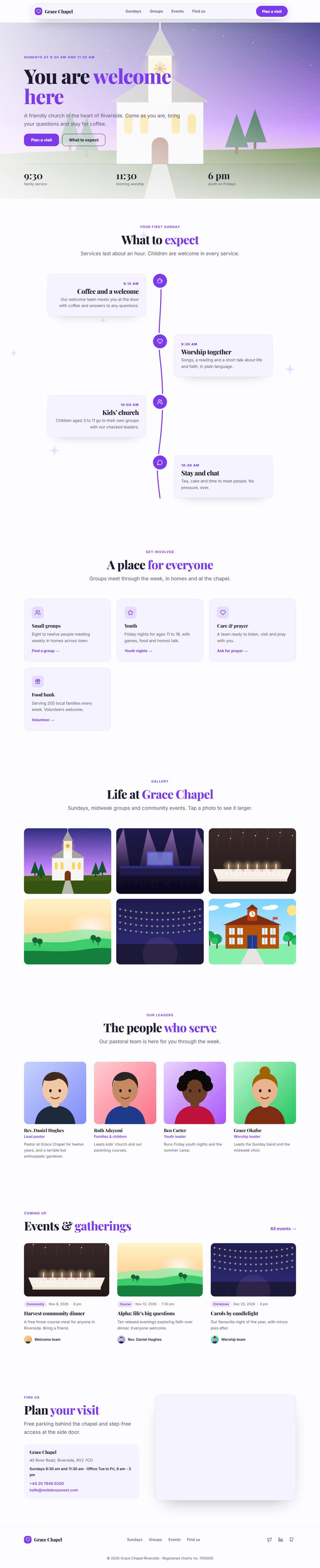
A welcoming site for churches, parishes and ministries: service times right in the hero, what a first visit is like, a Sunday schedule that draws itself as you scroll, groups for every age, the people who lead them, upcoming events and directions to the door.
One page keeps everything on a single scrolling page. The 3-page website opens all its pages in the editor: Home, Events, Visit.



Church Website Template — Free, Editable, Export HTML
Community · One page or 3 pages · 8 sections · Playfair Display + Inter · Responsive · GSAP animation
Multi-page version
Pages in the 3-Page Church Website Template
What's included
Sections in the Church Website Template
About this template
A Free Church Website Template You Can Edit Online
A welcoming site for churches, parishes and ministries: service times right in the hero, what a first visit is like, a Sunday schedule that draws itself as you scroll, groups for every age, the people who lead them, upcoming events and directions to the door.
Use it as one scrolling page, or as a 3-page website (Home, Events, Visit) sharing one navbar, footer and theme. The one-page version is built from 8 sections of the Website Section Templates library and opens in the free Website Builder, where you can change every word and image, swap sections, set your own colours and fonts and export the finished site as clean HTML pages. The page is responsive, accessible and animated with GSAP, with content that stays visible without JavaScript.
The template ships with a Playfair Display and Inter font pairing and a colour theme suited to church websites; switch to any Google Font, upload your own, or apply your brand kit in one click.
Who it’s for
Best For
Step by step
How to Use This Template
- 1Open the templateClick “Use as one page” or “Use as 3-page website” to load it in the Website Builder. Your current website is kept in Saved.
- 2Make it yoursClick any section to change its text, images and links; upload your logo and photos.
- 3Set your brandPick colours and fonts in the Theme tab, or apply your saved brand kit.
- 4Adjust the pageAdd sections from the library, drag to reorder, duplicate or remove what you don’t need.
- 5Export and publishDownload the ZIP (one HTML file per page for the multi-page version) and upload it to Netlify, Vercel or any host.
Got questions?
Frequently Asked Questions
Yes. The Church Website template is free for personal and commercial use, with no sign-up, no watermark and no attribution required.
Click “Use this template” to open it in the free Website Builder. Click any section to change its text, images and links, change colours and fonts for the whole page in the Theme tab, and add, remove or drag sections to reorder them.
Both. Use it as one scrolling page, or as a 3-page website (Home, Events, Visit) that opens with every page in the editor. The pages share one navbar, footer and theme, and the menu links to every page automatically. Add more pages (About, Pricing, Contact, Blog and others) or remove any you don’t need in the builder’s Pages tab.
Yes. As one page you get a ZIP with index.html and an assets folder. As a 3-page website you get one HTML file per page (index.html, events.html, visit.html), a shared styles.css and script.js, and an assets folder with your images, then upload it to any web host. Links between pages also work when you open the files from your computer.
Yes. Every section is responsive with CSS container queries, and menus, accordions, carousels and forms work on touch screens and with a keyboard.
Yes. Everything is edited with simple forms. If you know HTML and CSS you can also edit the exported code directly; colours, fonts and sizes are CSS variables.