Click any text to edit it right here · click an image or link to jump to its setting
- Replace the placeholder links: Header link, Option 2 link, Option 3 link, Help centre link.
Shipping Delay Email
Responsive · Dark mode
Abandoned Cart Email
Responsive · Dark mode
Back in Stock Email
Responsive · Dark mode
Order Confirmation Email
Responsive · Dark mode
Order Cancellation Email
Responsive · Dark mode
Shipping Confirmation Email
Responsive · Dark modeShipping Delay Email — Free Responsive HTML Email Template
E-commerce · v1.0.0 · Updated 2026-11-03 · Gmail, Outlook & Apple Mail · Dark mode
What's included
Features
About this template
Shipping Delay Email — Free Order Delay Apology Template
Shipping Delay Email tells a customer their order will arrive later than promised, before they have to ask. Late parcels are a top cause of support tickets, chargebacks and one-star reviews, and the damage comes less from the delay itself than from silence. A short, honest email with real options keeps most of those customers, and some come away more loyal than before.
Old date out, new date in
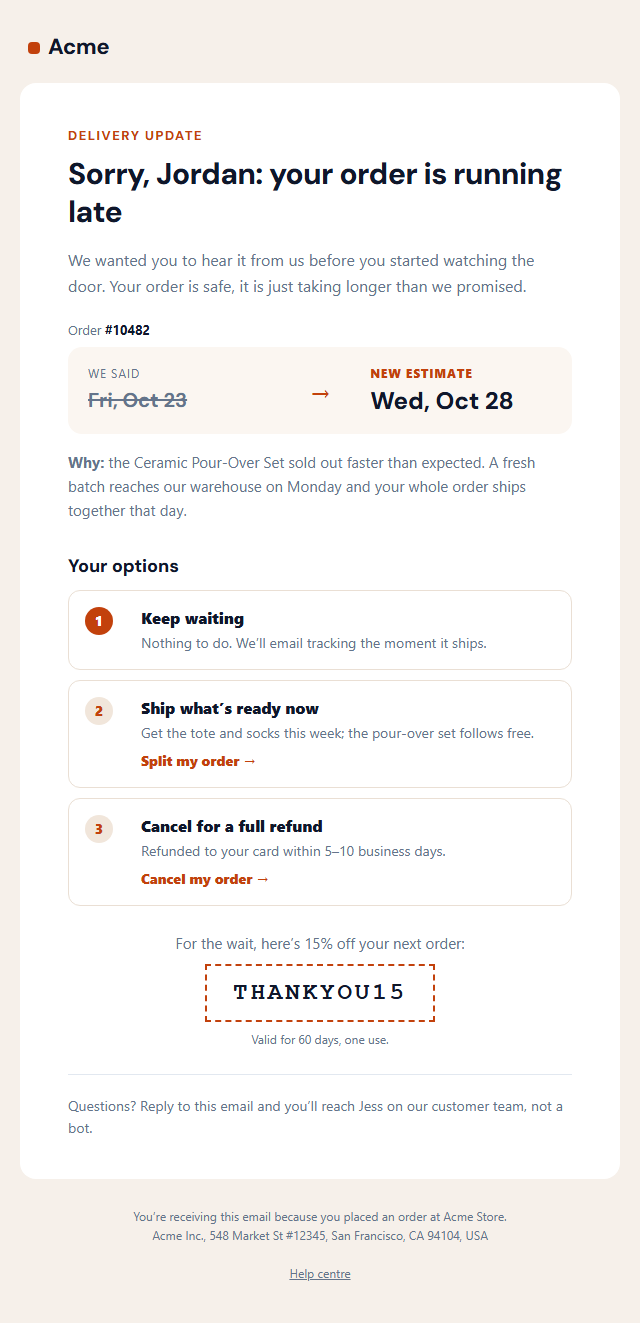
After a direct headline ("Sorry, Jordan: your order is running late") and an intro that admits the problem without excuses, a soft panel shows "We said" with the original estimate struck through, an arrow, and "New estimate" with the new date in large type. On phones the two stack and the arrow is hidden. The customer gets the new date in one look.
An honest reason
A sentence underneath says why, in plain words. "The pour-over set sold out faster than expected and a new batch arrives Monday" is believable and specific; "due to unforeseen circumstances" is not. When people understand a delay, they wait.
Three real choices
"Your options" lists up to three numbered cards. The default is "Keep waiting" with nothing to do. The others offer action links: ship the items that are ready now, or cancel for a full refund with the timing spelled out. Offering cancellation openly sounds risky, but it prevents chargebacks and angry reviews, and most people choose to wait once they feel in control.
An apology that costs little
An optional dashed coupon box offers a discount for next time, with its small print. Finish with the name of a real person who reads the replies, not a bot.
Paste the HTML into Shopify notifications, Klaviyo, Gorgias macros or your helpdesk, and send it as soon as you know a promised date will be missed. It is about an existing order, so it is transactional; the coupon line is small, but check your sender's rules. If the customer cancels, follow up with the Order Cancellation email; when it arrives, the Order Delivered one.
Extend with AI
Take This Email Further With AI
Give this prompt to an AI assistant to write your own version of the Shipping Delay Email email: draft ten subject lines and preheaders, adapt the copy for a customer segment, translate it, convert it to MJML or React Email, or write the plain-text version. Then paste the result back into the editor above to check it in desktop, mobile and dark mode.
Prompt to recreate it
Copy this into your AI assistant of choice to build the effect from scratch, or as a jumping-off point for your own variant:
Create a responsive HTML email: “Shipping Delay Email”, an e-commerce email.

Purpose: An honest "your order is running late" email that keeps the customer’s trust: the original delivery estimate struck through beside the new one, a plain reason for the delay, three clear choices (keep waiting, swap the item, or cancel for a full refund), an optional apology discount code and a direct line to a real person.

Inbox text:
- Subject line: “Your order #10482 is running a few days late”
- Preheader (hidden preview text): “New estimate: Wed, Oct 28. Here’s why, and your options if that doesn’t work for you.”

Content, top to bottom:
- Message
- Old and new delivery date
- Your options (leave a title empty to hide it)
- Apology code

Headline: “Sorry, {{first_name}}: your order is running late”.
Show products with an image, name and price in a grid that stacks on mobile, and make the button the most visible element.

Build it like a professional email developer:
- Table-based layout, 600px wide on desktop and fluid on mobile (width 100%, max-width 600px).
- Inline CSS on every element, with one small style block only for media queries and dark mode (prefers-color-scheme).
- A bulletproof, Outlook-safe call-to-action button (padded table cell with a VML fallback), never an image.
- Colours: brand and button #c2410c, button text #ffffff, page background #f6f0ea. Web-safe font stack with a fallback after the brand font.
- Every image has alt text and explicit width and height. Use PNG icons, never SVG, because Gmail and Outlook drop them.
- Hidden preheader text, a plain-text version, and a legal footer with the postal address, the reason the person is receiving it and a working unsubscribe link.

Finish with a short checklist of what to test in Gmail, Outlook for Windows, Apple Mail, mobile and dark mode.
Want to tighten it up first? Run this prompt through the AI Prompt Studio to score it across 8 quality dimensions, catch anti-patterns, and tune the wording for Claude, ChatGPT, or Gemini before you paste it in.
Why use it
Why Use the Shipping Delay Email Template
How it’s different
How It’s Different From Other Free Email Templates
Step by step
How to Use
- 1Pick your email platformChoose Mailchimp, Klaviyo, HubSpot or Brevo under Merge tags so first names and unsubscribe links export in its syntax, or keep plain {{first_name}} tokens.
- 2Edit the contentFill in the message, old and new delivery date, your options and apology code, or click any text in the preview to jump to its field. Switch the apology code on or off.
- 3Add your brandUpload or paste your logo, set the brand colour and the light and dark palettes, pick fonts, or apply your saved brand kit.
- 4Preview and checkSwitch between desktop, mobile and dark mode, and fix anything the pre-send checks flag, such as placeholder links or missing alt text.
- 5Export or forkCopy the HTML into Shopify, Klaviyo, Omnisend, Postmark or your own code, copy the plain-text version, download a ZIP with images, or fork it into My Code.
Real-world uses
Common Use Cases
Got questions?
Frequently Asked Questions
Apologise, give the original and new delivery dates, explain the reason honestly, list the customer’s options (wait, change or cancel for a refund) and say how to reach a real person. Send it as soon as you know the date will be missed.
For short delays a sincere apology and a clear new date are often enough. For longer delays or holiday gifts, a small code for the next order is a cheap way to keep goodwill. Switch the code box off when you do not need it.
Yes. Customers can usually cancel anyway, and offering it openly with the refund timing prevents chargebacks and angry reviews. In practice most people choose to wait once they feel they have the choice.
Yes. Paste the HTML into a Shopify Email or Klaviyo flow triggered by a delayed tag, or save it as a Gorgias, Zendesk or Help Scout macro, replacing the dates and order number with that tool’s variables.
Yes. It updates an order the customer placed. A small apology code is generally fine, but heavy promotion would make it commercial; keep the main purpose the order update.
It saves an editable copy of your Shipping Delay Email in My Code, the UI Snippets code editor: the email markup goes in the HTML panel and its CSS (mobile and dark-mode rules plus fonts) in the CSS panel, so you can keep refining the code and save your own versions.
Yes. It is free for personal and commercial email, with no sign-up and no watermark. Everything runs in your browser, and your edits are saved locally.